IPv6 Configuration for ZoneDirector Discovery Using DHCPv6
Beginning with release 9.13, ZoneDirector also supports AP discovery using IPv6 DHCP
Option 17 (in addition to IPv4 DHCP Option 43).
Note: The following instructions assume isc-dhcp-server as the Linux DHCP server. For other
DHCP servers, refer to the relevant documentation for instructions on customizing
the DHCPv6 Option 17 sub-options.
To configure a DHCPv6 server for AP controller discovery, use the following procedure:
- Install radvd
- Install isc-dhcp-server:
- Edit the “/etc/radvd.conf” file as follows:
- Edit the “dhcp6.conf file” as follows:
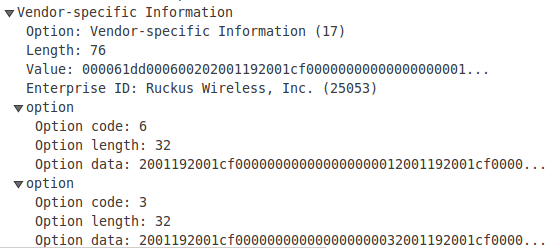
default-lease-time 600; max-lease-time 7200; log-facility local7; subnet6 2001:db8:0:2::/64 { # Range for clients range6 2001:db8:0:2::129 2001:db8:0:2::254; # Additional options option dhcp6.name-servers fec0:0:0:1::1; option dhcp6.domain-search "domain.example"; option dhcp6.vendor-opts 00:00:61:dd: 00:06:<-- suboption code 6 for SmartZone List 00:20:<-- suboption length, 2 IP addresses in the list, so value is 0x20 20:01:19:20:01:cf:00:00:00:00:00:00:00:00:00:01:<-- IP address 20:01:19:20:01:cf:00:00:00:00:00:00:00:00:00:02:<-- IP address 00:03:<-- suboption code 3 for ZD List 00:20:<-- suboption length, 2 IP addresses in the list, so value is 0x20 20:01:19:20:01:cf:00:00:00:00:00:00:00:00:00:03:<-- IP address 20:01:19:20:01:cf:00:00:00:00:00:00:00:00:00:04;<-- IP address # Prefix range for delegation to sub-routers prefix6 2001:db8:0:200:: 2001:db8:0:f00:: /56; # Example for a fixed host address host specialclient { host-identifier option dhcp6.client-id 00:01:00:01:4a:1f:ba:e3:60:b9:1f:01:23:45; fixed-address6 2001:db8:0:2::127; - To confirm that the AP has received the correct IP info through DHCPv6 option 17, you can check the /tmp/dhcp6_vendor_opts file. Use the following command on the AP CLI:
- You have completed configuring the isc-dhcp-server for controller discovery using DHCPv6 Option 17. To confirm that the DHCPv6 options are configured properly (whether using isc-dhcp-server or another DHCPv6 server), you should ensure that the Option 17 configuration looks like the following figure: