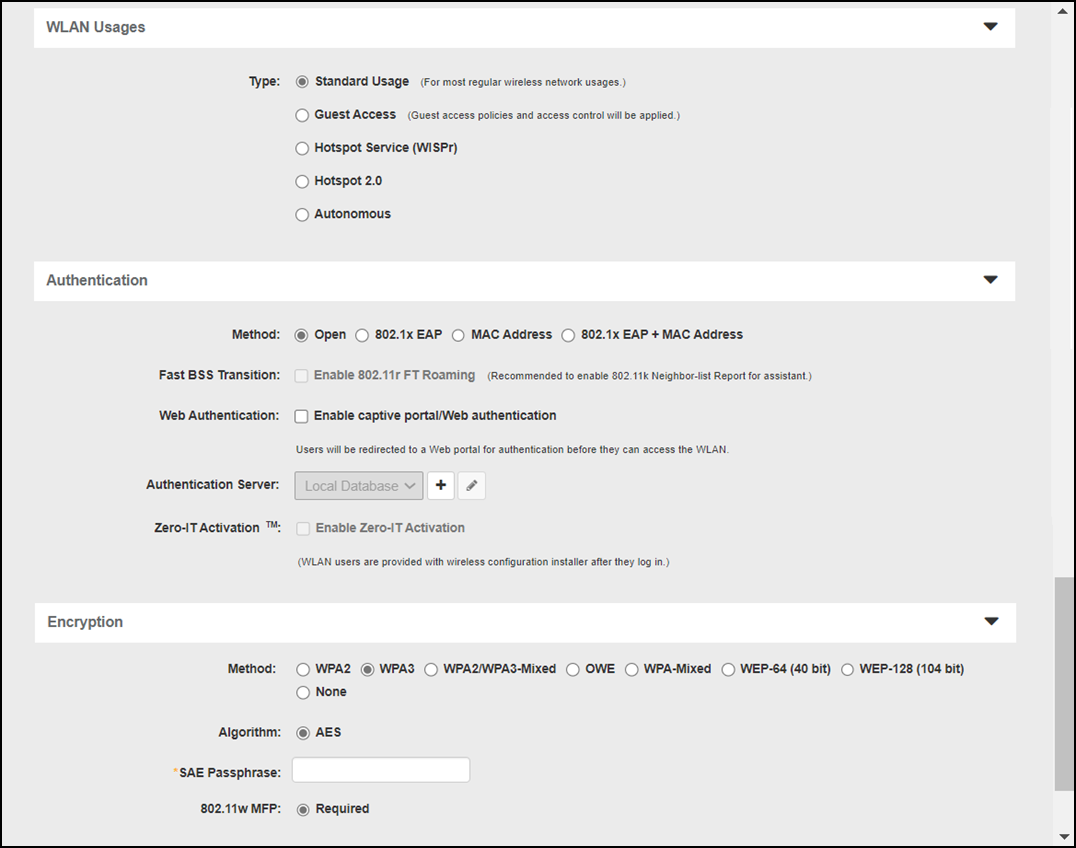
SAE Passphrase (Only for WPA3 and WPA2/WPA3-Mixed WLANs)
The SAE Passphrase (Simultaneous Authentication of Equals) is a new authentication algorithm for WPA3 that replaces the Pre-Shared Key used in WPA2. SAE Passphrases are designed to simplify login for devices with no keyboards, and to mitigate the risk of weak passwords that can be easily defeating using dictionary attacks.
Complete the following procedure to configure a WLAN using the SAE passphrase encryption method.
- From the ZoneDirector dashboard, go to Wireless LANs.
- Select a WLAN group from the left pane and select the WLAN that you want to configure and click Edit (or click Create to create a new WLAN, refer to Creating a Wireless LAN).
- Under WLAN Usages, for Type, select Standard Usage.
- Under Authentication, for Method, select Open.
- Under Encryption, for Method, select WPA3 or WPA2/WPA3-Mixed and enter the password for PSK and SAE passphrases.
- Click OK to save your changes.