Enabling Trusted Channel Using IEEE 802.11-2012 (WPA2) Standards
You can enable a secure and trusted channel for communication by using IEEE 802.11-2012
(WPA2) standards. This connection is initiated from the beginning by itself with WPA2
four-way handshake. This is as per WPA2 standard, and no manual intervention needed.
IF the Wireless communication is interrupted/Broken user needs to reauthenticate via
wireless device to reestablish the connection
- In the controller interface, select
- Select the zone that you want to configure and click
Create.
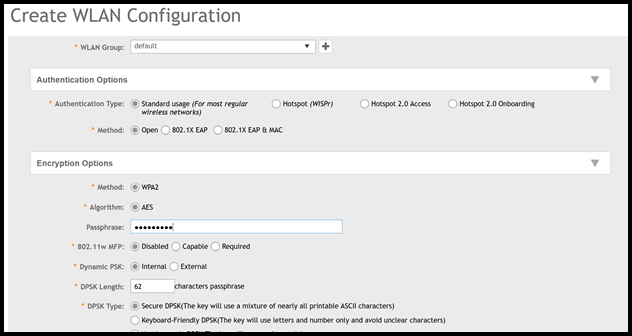
The Create WLAN Configuration page is displayed. Configure the settings as necessary.
Under Authentication Options, for Method, select
Open. Under Encryption Options, for Method, selectWPA2.Attention: The Hexadecimal (0 to 9 and A to F) characters are only allowed, no other ASCII characters. You have to use exactly 64 hexadecimal characters. 22 to 63 text-based characters are also supported For example, f!rstwPa2%PSK-Wl@nPa$$w0rd or abcdefghijklmnopqrstwuvxyz0123456789$@Abcdefghijklmnopqrstwuvxy..