Classifying a Rogue Policy
3.6 Update
You can create rogue classification policy with rules at the zone and monitoring
group level. This helps in automatic classification behavior when a specific-rogue
detection criteria are met.
- Select .
- Under Policy, select the zone for which you want to create the policy and click Create.
- Enter the policy name and description.
- Under
Rogue Classification Rules, click
Create and complete the following steps to create a rogue classification rule.
- In the Name field, enter the rule name.
- Under
Rule Type, select one from the following rule type for classification:
5.1.2 update
- Ad Hoc: The monitoring AP is able to detect the ad hoc network as a rogue.
- Clear to Send (CTS) Abuse: Reported when the number of CTS frames per second to a specific receiver MAC address exceeds the specific threshold. The default number of frames per second is 50.
- Authentication Flood: Reported when the number of Authentication frames per second exceeds the specific threshold from a specific transmitter. The default number of frames per second is 50.
- EAP Handshake Flood: Reported when the number of EAPOL frames per second exceeds the specific threshold from a specific transmitter. The default number of frames per second is 50.
- Deauth Flood: Reported when the number of deauthentication frames per second exceeds the specific threshold from a specific transmitter. The default number of frames per second is 50.
- Disassoc Flood: Reported when the number of disassociation frames per second exceeds the specific threshold from specific transmitter. The default number of frames per second is 50.
- Request to Send (RTS) Abuse: Reported when the number of RTS frames per second to a specific receiver MAC address exceeds the specific threshold. The default number of frames per second is 50.
- Excessive Power
- Low RSSI: In the Signal Threshold field, enter the RSSI threshold in dBm.
- MAC OUI: In the MAC OUI field, enter the first three octets of the MAC address. For example, for a MAC address 11:22:33:44:55:66, the MAC OUI is 11:22:33.
- MAC (BSSID) Spoofing
- Same Network
- SSID: Enter the partial or complete SSID string regardless of the zone being configured with the specific SSID.
NULL SSID- SSID Spoofing: Enter the SSID that is configured in a specific zone from a non-managed AP.
- Auth Flood: Reported when the number of Auth flood frames per second exceeds the specific threshold from a specific transmitter. The default number of frames per second is 50.
- EAP Flood: Reported when the number of EAP flood frames per second exceeds the specific threshold from a specific transmitter. The default number of frames per second is 50.
- Under Classification, select one of the following actions to be taken for the selected rule type:
- Click OK to save the changes.
- Click OK.
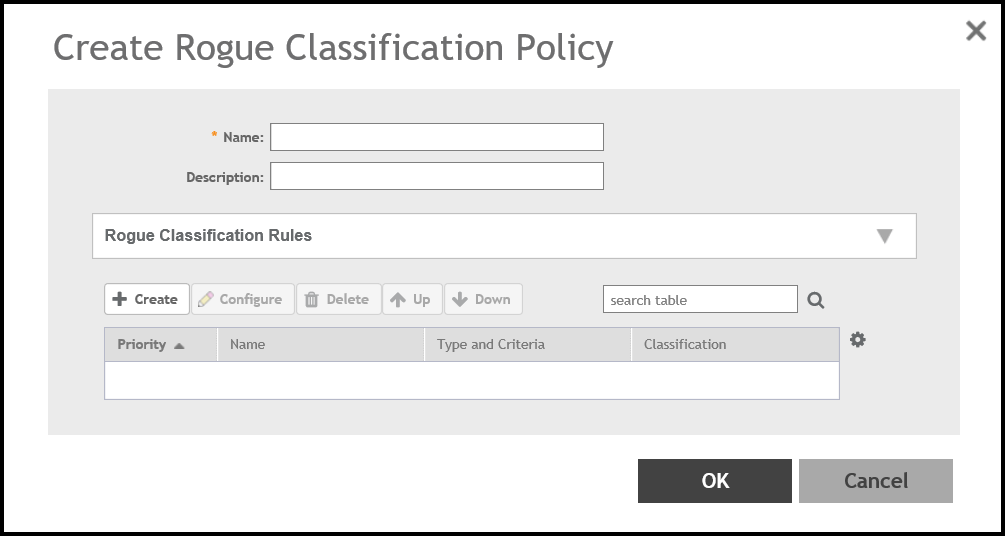
Note: Click
Configure or
Delete to edit or delete a rogue classification policy respectively. To prioritize a classification
rule, select the rule from the list and click
Up or
Down to position the rule.
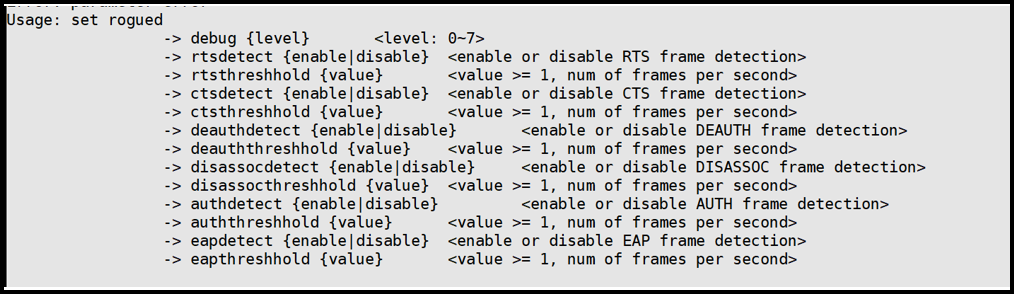
Note: You can use CLI option in SZ to disable or
change threshold packets per seconds for CTS abuse, RTS abuse, Deauth flood and
disassociation flood.
- To change the threshold detection follow the CLI command: remote ap-cli <ap-mac> "set rogued <attack-type> <number pf packets>". Example: remote ap-cli 8c:fe:74:1c:d6:b8 "set rogued rtsthreshhold 10"
- To enable / disable flood detection follow the CLI command : remote ap-cli <ap-mac> "set rogued <attack-type> enable/disable". Example: remote ap-cli 8c:fe:74:1c:d6:b8 "set rogued rtsdetect enable"