Creating an IPSec Profile
On the controller web user interface:
- Navigate to .
- Select the tabIPSec and select the required zone for creating the required profile.
- Click on Create to view the Create IPSec Profile page.
- Configure the following:
- Name: Type the name of the profile.
- Description: Type the description of the profile.
- Tunnel Mode : Select Ruckus GRE.
- Security Association:
- IKE Proposal Type: Select the proposal type as AES128-SHA1-MODP2048 or AES256-SHA384-ECP384
- ESP Proposal Type : Select the proposal type as
AES128-SHA1-MODP2048 or
AES256-SHA384-ECP384.
Note: WLAN controller will not allow ESP proposal to be less secured than IKE Proposal . If AES128-SHA1-MODP2048 is selected for IKE, WLAN controller will allow both AES128-SHA1-MODP2048and AES256-SHA384-ECP384 for ESP. However, if AES256-SHA384-ECP384 is selected for IKE only AES256-SHA384-ECP384 will be allowed for ESP.
- Click OK.
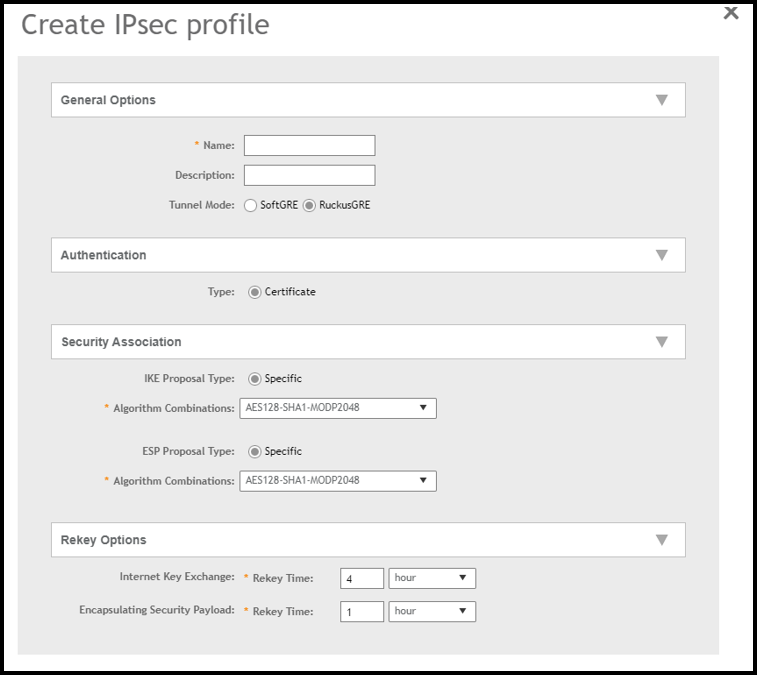
You have created the IPSec GRE profile.