Downloading vSZ-D FIPS Logs

vSZ-D FIPS logs can be downloaded to the local machine. Only the CO (admin) can view and download the FIPS log from the web interface.

Perform the following steps to download vSZ-D FIPS logs.

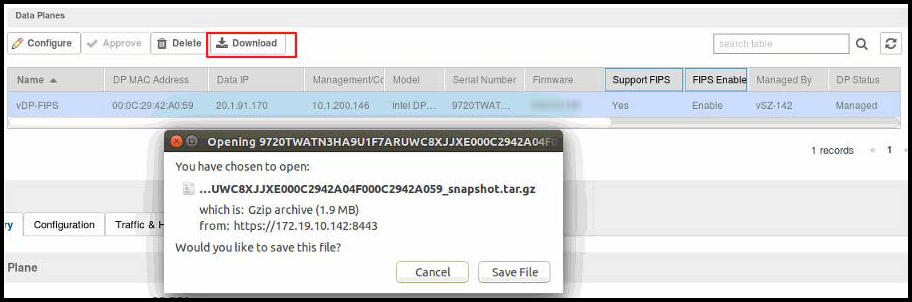
  1. In the web interface, navigate to System > Clusters > Data Planes.
  2. Select the vSZ-D that has joined the controller.
  3. Click the Download option.
  4. In the displayed dialog, click Save File.
    Note: As an alternative, you can download the logs from Diagnostics > Application Logs > DBlade in the web interface.

    Downloading vSZ-D FIPS Logs

  5. Pay attention to the following considerations when downloading vSZ-D FIPS logs

    • Only a FIPS SKU vSZ-D can join a vSZ controller with a FIPS SKU set.

    • FIPS mode is replicated to vSZ-D after a successful join.

    • The zeroization effect on vSZ is not replicated on vSZ-D because it is an independent node that loses the network connection with vSZ.