Managing PEs
Once the Campus Fabric domain is deployed, you may want to optimize PEs in various ways. Zero-touch deployment provides two options for managing PE IDs.
Previously, changing PE IDs required powering down the units and changing the PE ID configuration.
With option 1 of SPX interactive-setup, you can change PE IDs without shutting down the PEs or changing any connections or topology. Refer to Deployment Scenario 6: Changing PE IDs Using SPX Interactive-Setup.
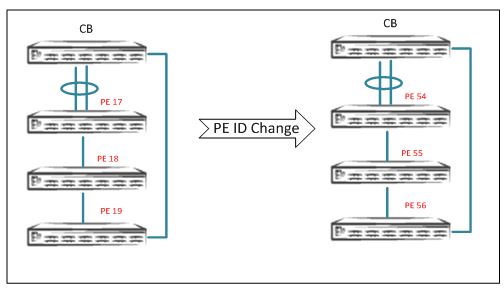
Recommendations for PE ID Changes
-
PE ID changes are allowed when IDs are not already used in the topology.
-
If any IDs are in the reserved configuration, they are not available for use when PE IDs are changed.
-
Swapping PE IDs is not allowed.
-
PE ID changes do not require any change to the topology or to existing connections.
Note: If you want to change PE IDs, Ruckus recommends that you change them during the initial deployment of Campus Fabric before connecting hosts or configuring any protocols.
Customers may want to move PEs to other CB or PE SPX ports or SPX LAGs and still
use the same PE IDs. SPX PE movement requires the
spx allow-pe-movement option to be enabled in global configuration.
SPX# configure terminal
SPX(config)# spx allow-pe-movement
Please remove the spx allow-pe-movement configuration after the PEs are moved.
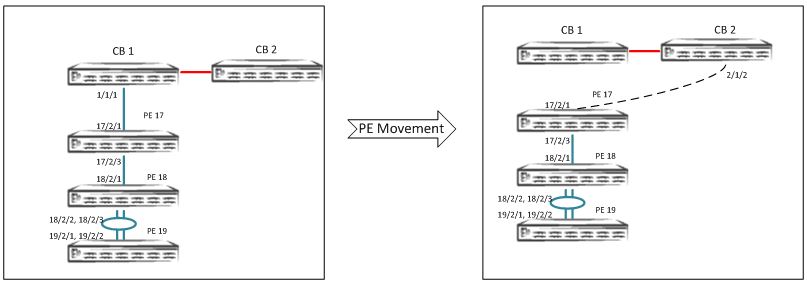
Move PEs by changing connections or topology but retaining the old PE ID: This is
achieved with the
spx allow-pe-movement command. Refer to
Deployment Scenario 7: SPX PE Movement: Moving PEs Without Changing IDs.
SPX Interactive-Setup Enhancement
Beginning with FastIron 08.0.70, SPX interactive-setup has an additional feature. Refer to Deployment Scenario 8: Adding a New Link Between CB-PE or PE-PE to Change Existing Linear Toplogy to Ring Topology.