Deployment Scenario 8: Adding a New Link Between CB-PE or PE-PE to Change Existing Linear Toplogy to Ring Topology
Make all necessary physical connections between two edge PEs or between an edge PE and the CB. At least one end of the link must be one of these port types:
CB SPX port or SPX LAG member with no live PE link.
CB port with zero-touch port configuration.
Edge PE port on a non-base-module (2, 3, and 4 are non-base modules), excluding upstream SPX port or SPX LAG members and ports with configuration. In this case, the edge PE is the last unit of a PE chain.
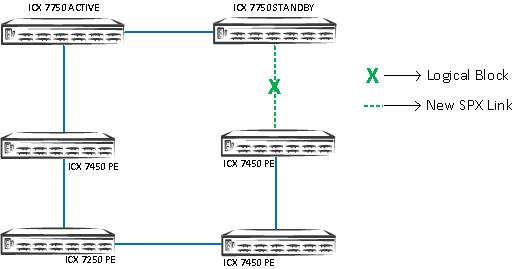
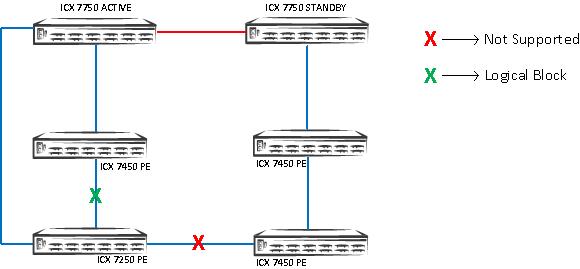
SPX interactive-setup provides an option to discover new links and convert chains to a ring.
- In EXEC mode, enter the
spx interactive-setupcommand, and select either option 2 or 3 when prompted.ICX7750-20Q Router# spx interactive-setup You can abort spx interactive-setup at any stage by <ctrl-c> CBPE17PE18PE20PE21PE24data portPE21PE241G10Ga) T-connectionb) CB data portsd) different speedsPE21PE24c) PE data ports have configurationconfig 0: quit 1: change PE IDs 2: discover and convert new units (no startup-config flash) to PEs 3: discover and convert existing/new standalone units to PEs 2&3 can also find new links and convert chain(s) to ring. Please type your selection: 2 Probing topology to find new units...
- After the process completes, enter the
write memorycommand to save the newly generated SPX port and SPX LAG configuration.Probing topology to find new units... Detect 2 new links (classified to 1 logical link) between existing units. New logical link 0: ======================================================= +----+ +----+ +----+ +----+ 2/1/9--4/1| 23 |2/1==2/1| 24 |2/5==2/1| 25 |2/5==2/5| 26 | +----+ +----+ +----+ +----+ +----+ +----+ 1/1/5==3/1| 17 |2/1==2/1| 27 | +----+ +----+ The new logical link (PE26--PE27: 2 link(s): 26/2/1-27/2/3 26/2/2-27/2/4) will make the above two chains to form a ring. Do you want to select this link? (enter 'y' or 'n'): y spx interactive-setup discovers 1 link (valid#= 1, selected#= 1) and 0 chain ICX7750-20Q Router#T=53m40.8: Add spx-lag 26/2/1 to 26/2/2 for PE 26 to form a ring. Please do "write memory". T=53m40.8: Add spx-lag 27/2/3 to 27/2/4 for for PE 27 to form a ring. Please do "write memory". ICX7750-20Q Router# write memory ICX7750-20Q Router# show spx … snipped active standby +---+ +---+ +---+ =2/1| 2 |2/4--2/4| 3 |2/1==2/1| 1 |2/4= | +---+ +---+ +---+ | | | |-------------------------------------| +----+ +----+ +----+ +----+ +----+ 1/1/5==3/1| 17 |2/1==2/1| 27 |2/3==2/1| 26 |2/5==2/5| 25 |2/1==2/5| 24 |2/1= +----+ +----+ +----+ +----+ +----+ | | +----+ | 2/1/9--4/1| 23 |2/1= +----
Any invalid connection is reported in a system message, and you are asked to remove it. Valid connections and ring formation are reported in system output.
The following example shows a warning message received after an invalid connection was detected.
Warning! The following 1 logical link(s) are invalid. Please remove them because they may cause
loops.
CB--PE17: error: CB 1/1/5 isn't spx-port/lag or ZTP-ports, 2 link(s): 1/1/5-17/3/1 1/1/7-17/4/1
Spx interactive-setup does not find any new unit
spx interactive-setup detects invalid topology, aborts
The following example shows a system message received when a valid connection is detected
that cannot be handled by the system. In this case, you are requested to use the multi-spx-port or multi-spx-lag command to add the link, or to remove the link to avoid loops.
The following 1 logical link(s) would expand existing spx-port/lag. They are not handled.
Please manually use "multi-spx-port/lag" to add the link to existing spx-port/lag, or remove them
because they may cause loops.
PE17--PE27: 1 link(s): 17/2/1-27/2/1