Best Practices
One recommended method for creating a PE ring is to connect two edge PEs in an existing SPX domain, as shown in the following figure. The procedure for forming an PE ring is explained in Deployment Scenario 1: Deploying a PE Ring in an Existing Campus Fabric Domain.
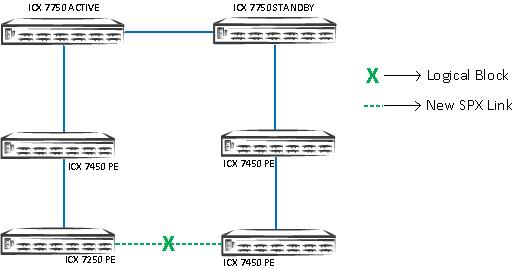
The second recommended method for creating a PE ring is to connect the edge PE of the existing PE chain to the CB, as shown in the following figure. The procedure for forming a PE ring is explained in Deployment Scenario 1: Deploying a PE Ring in an Existing Campus Fabric Domain.
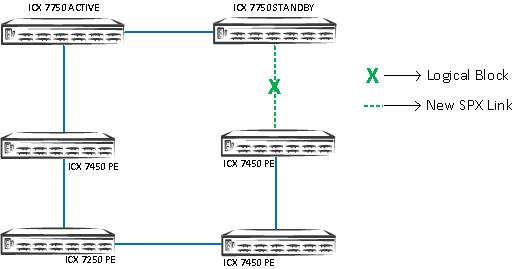
Beginning with FastIron 08.0.70, SPX interactive-setup option 2&3 can detect new links between a CB unit and an edge PE or between two edge PE units. When these links are detected, the associated PE chain or, if present, both associated PE chains are converted into a ring. Refer to Deployment Scenario 8: Adding a New Link Between CB-PE or PE-PE to Change Existing Linear Toplogy to Ring Topology.
To manage several PEs, you can configure a PE group (for example, for each PE chain) using the pe-groupname parameter with the
spx-portorspx-lagcommand. The following example gives the name "ENG" to the SPX LAG formed by CB ports 1/1/1 and 1/1/2. Theshow spxcommand output for the group indicates that the LAG connects to a chain of two PEs (PE 17 and PE 18).ICX7750-48F Router(config-spx-cb)# spx-lag 1/1/1 to 1/1/2 pe-groupENG ICX7750-48F Router(config-spx-cb)# show spx pe-groupENG Show PEs attached to pe-group ENG (port 1/1/1) T=1d11h57m20.9: alone: standalone, D: dynamic cfg, S: static ID Type Role Mac Address Pri State Comment 1 S ICX7750-48XGF active cc4e.246e.3480 128 local Ready 2 S ICX7750-20QXG standby cc4e.2438.8780 128 remote Ready 3 S ICX7750-48XGC member cc4e.2470.6000 0 remote Ready 17 S ICX7450-48P spx-pe cc4e.248a.8ba8 N/A remote Ready 18 S ICX7450-24P spx-pe cc4e.2489.a818 N/A remote Ready active standby +---+ +---+ +---+ -2/1| 1 |2/4--2/1| 3 |2/4--2/4| 2 |2/1- | +---+ +---+ +---+ | | | |-------------------------------------| +----+ +----+ 1/1/1==2/1| 17 |2/3--2/1| 18 |2/3- +----+ +----+ ICX7750-48F Router(config-spx-cb)#You can configure a PE name for individual PE units to manage a larger network.
ICX7750-48F Router(config)# spx unit  17
ICX7750-48F Router(config-spx-unit-17)# pe-name workstations

ICX7750-48F Router(config)# show run | beg spx unit
spx unit 17
  pe-name workstations
  module 1 icx7450-48p-poe-management-module
  module 2 icx7400-xgf-4port-40g-module
  module 3 icx7400-qsfp-1port-40g-module
  module 4 icx7400-qsfp-1port-40g-module
  spx-lag 17/2/1 to 17/2/2
  spx-port 17/2/3
If a PE in jumbo mode does not match the CB mode (for example, if a PE is jumbo-disabled and the CB is jumbo-enabled), the PE will reload soon after joining the CB. To avoid the second reload, configure jumbo in provisional PE mode, if jumbo is enabled on the CB.
[Provisional-PE]ICX7450-48 Router(config)# jumbo
 [Provisional-PE]ICX7450-48 Router(config)# show running-config
Current configuration:
!
ver 08.0.40bT213
!
spx pe-enable
spx suggested-id 56
spx unit 1
  module 1 icx7450-48-port-management-module
  module 3 icx7400-qsfp-1port-40g-module
  module 4 icx7400-qsfp-1port-40g-module
  spx-port 1/3/1
  spx-port 1/4/1
!
jumbo
!
end
You can configure a suggested ID while adding a PE. This ID can be configured when the PE is SPX-enabled and in provisional PE mode. If a suggested ID is not configured, the CB assigns the first available ID to the PE.
[Provisional-PE]ICX7450-48 Router(config)# spx suggested-id 56
You can bring the operational PE unit back to the ICX 7450 standalone unit by using the
spx unconfigure mecommand.[PE]local-18@ICX7450-24P Router# spx unconfigure me This unit will remove the PE startup file and reload as a standalone. Are you sure? (enter 'y' or 'n'): y remove PE startup file [PE]local-18@ICX7450-24P Router#
If an operational PE becomes detached from the CB, the non-SPX PE ports become disabled, but PoE on those ports remains up, making the access AP/phones up. The CB keeps the configuration of the PE ports. The SPX ports still stay admin up.
Disable LLDP on user ports where it is not required for the FastIron system to scale and avoid high CPU issues.
Do not configure one PE as a ring. If a single PE ring is detected in the topology, one of the SPX ports that forms the ring is moved to the ERR-DIS state.
Client-facing LAGs are not supported over PE virtual ports.