System Deployment Procedure Using SPX Interactive-Setup
-
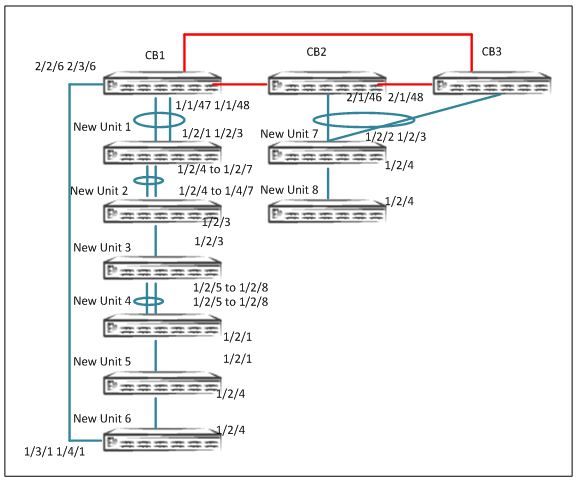
The user must cable the connections per the topology and PE requirements. Make sure that the connected PEs do not have a startup configuration.
-
Multiple linear or ring chains can be discovered at the same time by zero-touch.
-
Refer to the Ruckus ICX 7450, ICX 7750, and ICX 7250 Stacking Deployment Guide for information on bringing up an ICX 7750 stack.
- On the ICX 7750 stack or standalone unit, enter the
spx cb-enablecommand. - If zero-touch is enabled, make sure that the utility is turned off before running SPX interactive-setup.
- Configure zero-touch ports or SPX ports and SPX LAGs that connect to the CB.
For a linear topology: Specify the zero-touch ports that connect the CB to the transit PE.
For a ring topology: Specify the zero-touch ports that connect the CB to a PE on both ends.
SPX# configure terminal
SPX(config)# spx cb-configure
SPX (config-spx-cb)# zero-touch-ports 1/1/47 2/1/46 2/1/48 2/2/6 3/2/6
- Run the SPX interactive-setup utility on the CB active controller. The discovered
topology is displayed.
ICX7750-48F Router# spx interactive-setup You can abort spx interactive-setup at any stage by <ctrl-c> 0: quit 1: change PE IDs 2: discover and convert new units (no startup-config flash) to PEs 3: discover and convert existing/new standalone units to PEs Please type your selection: 2 Probing topology to find new units... Horizontal bars link to discovered units. Vertical bars link to CB or PEs. #1: icx7450-24-port-management-module 609C.9F39.DAA8 #2: icx7450-24-port-management-module CC4E.248B.AD08 #3: icx7250-24-port-management-module CC4E.24DF.0E3E #4: icx7250-24-port-management-module CC4E.24DE.4C0A #5: icx7250-24-port-management-module CC4E.24DF.0CD6 #6: icx7250-24-port-management-module CC4E.24DF.0A72 2/2/6 || || 3/1 +----+ +----+ +----+ +----+ +----+ | 1 |2/4--2/4| 2 |2/1==2/1| 3 |2/5==2/5| 4 |2/3--2/3| 5 |2/2= +----+ +----+ +----+ +----+ +----+ | | +----+ | | 6 |2/2= +----+ 2/1 || || 1/1/47 Chain #1: ================================================================== #7: icx7450-32zp-poe-management-module CC4E.24F7.43F0 #8: icx7450-32zp-poe-management-module 609C.9F1D.AF60 2/1/46 || || 2/1 +----+ +----+ | 7 |2/4--2/4| 8 | +----+ +----+ - Select the chains to be kept in the configuration. The system displays default IDs.
Before the system is confirmed, the system prompts you to select or change the default
IDs.
chain #0: Do you want to select this chain?(enter 'y' or 'n'): y #1: icx7450-24-port-management 609C.9F39.DAA8, type an ID (No: 0, default: 17): 17 #2: icx7450-24-port-management CC4E.248B.AD08, type an ID (No: 0, default: 18): 18 #3: icx7250-24-port-management CC4E.24DF.0E3E, type an ID (No: 0, default: 19): 19 #4: icx7250-24-port-management CC4E.24DE.4C0A, type an ID (No: 0, default: 20): 20 #5: icx7250-24-port-management CC4E.24DF.0CD6, type an ID (No: 0, default: 21): 21 #6: icx7250-24-port-management CC4E.24DF.0A72, type an ID (No: 0, default: 22): 22 You selected 6 unit(s): #1: ID=17, #2: ID=18, #3: ID=19, #4: ID=20, #5: ID=21, #6: ID=22, #6 #5 #4 #3 #2 +----+ +----+ +----+ +----+ +----+ 1/1/47==2/1| 22 |2/2==2/2| 21 |2/3--2/3| 20 |2/5==2/5| 19 |2/1==2/1| 18 |2/4- +----+ +----+ +----+ +----+ +----+ | #1 | +----+ | 2/2/6==3/1| 17 |2/4- +----+ Proceeding will produce the above topology. Do you accept it? (enter 'y' or 'n'): y Chain #1: ================================================================== #7: icx7450-32zp-poe-management-module CC4E.24F7.43F0 #8: icx7450-32zp-poe-management-module 609C.9F1D.AF60 2/1/46 || || 2/1 +----+ +----+ | 7 |2/4--2/4| 8 | +----+ +----+ chain #1: Do you want to select this chain?(enter 'y' or 'n'): y #7: icx7450-32zp-poe-management CC4E.24F7.43F0, type an ID (No: 0, default: 23): 23 #8: icx7450-32zp-poe-management 609C.9F1D.AF60, type an ID (No: 0, default: 24): 24 - When the proposed topology is displayed, confirm it.
- All new units are reloaded as indicated by a message and rejoin as PE units.
Send reload to chain 0:  #6 CC4E.24DF.0A72 ID=22, D0: 2/1 2/3, D1: 2/2 2/4 to 2/7
#5 CC4E.24DF.0CD6 ID=21, D0: 2/2 2/4 to 2/7, D1: 2/3
#4 CC4E.24DE.4C0A ID=20, D0: 2/3, D1: 2/5 to 2/8
#3 CC4E.24DF.0E3E ID=19, D0: 2/5 to 2/8, D1: 2/1 2/3
#2 CC4E.248B.AD08 ID=18, D0: 2/1 2/3, D1: 2/4
#1 609C.9F39.DAA8 ID=17, D0: 2/4, D1: 3/1 4/1

Send reload to chain 1:  #7 CC4E.24F7.43F0 ID=23, D0: 2/1 to 2/3, D1: 2/4
#8 609C.9F1D.AF60 ID=24, D0: 2/4, D1:
- When all PEs are ready, use the
show running-configcommand to verify the SPX LAG configuration and and verify the PE IDs have been correctly generated. - Verify the PE operational state.
SPX# show spx T=20h16m21.5: alone: standalone, D: dynamic cfg, S: static ID Type Role Mac Address Pri State Comment 1 S ICX7750-48XGF active cc4e.246e.db80 128 local Ready 2 S ICX7750-48XGC standby 609c.9f1f.d900 128 remote Ready 3 S ICX7750-48XGC member 609c.9f1f.d180 0 remote Ready 17 S ICX7450-24G spx-pe 609c.9f39.daa8 N/A remote Ready 18 S ICX7450-24G spx-pe cc4e.248b.ad08 N/A remote Ready 19 S ICX7250-24 spx-pe cc4e.24df.0e3e N/A remote Ready 20 S ICX7250-24 spx-pe cc4e.24de.4c0a N/A remote Ready 21 S ICX7250-24 spx-pe cc4e.24df.0cd6 N/A remote Ready 22 S ICX7250-24 spx-pe cc4e.24df.0a72 N/A remote Ready 23 S ICX7450-32ZP spx-pe 609c.9f1d.afc0 N/A remote Ready 24 S ICX7450-32ZP spx-pe 609c.9f1d.af60 N/A remote Ready active standby +---+ +---+ +---+ -2/1| 1 |2/4--2/4| 2 |2/1==2/1| 3 |2/4- | +---+ +---+ +---+ | | | |-------------------------------------| +----+ +----+ +----+ +----+ +----+ 1/1/47==2/1| 22 |2/2==2/2| 21 |2/3--2/3| 20 |2/5==2/5| 19 |2/1--2/1| 18 |2/4- +----+ +----+ +----+ +----+ +----+ | | +----+ | 2/2/6==3/1| 17 |2/4- +----+ +----+ +----+ 2/1/46==2/2| 23 |2/4--2/4| 24 | +----+ +----+ - Once the topology is active, verify the CSP operational state using the
show spx csp allcommand. If there is a ring in the topology, verify the ring operational state using theshow spx ring allcommand.Note: There are no specific
showcommands for ZTP. All commands that apply to SPX apply to ZTP. Refer to Debugging and Verification Commands.
What is the full name of this deployment guide? The full name is required for a proper cross-reference.