Initial Deployment Procedure Zero-Touch Provisioning
-
The user must cable the connections per the topology and PE requirements.
-
Refer to the Ruckus ICX 7450, ICX 7750, and ICX 7250 Stacking Deployment Guide for information on bringing up a CB (ICX 7750) stack.
-
Multiple linear or ring chains can be discovered at the same time by zero-touch.
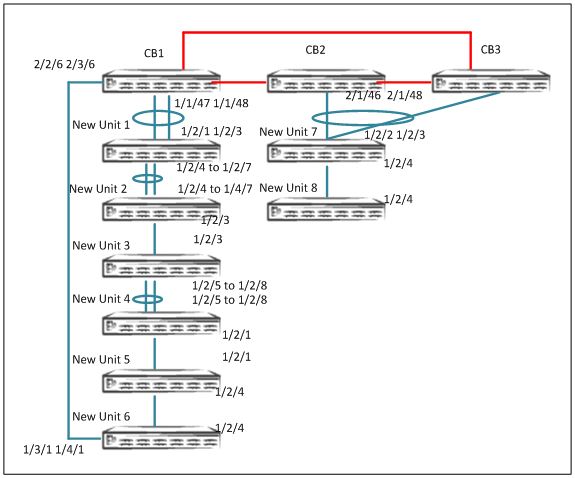
- On an ICX 7750 stack or standalone unit, enter the
spx cb-enablecommand. - Enable zero-touch under the CB configuration.
- Configure zero-touch ports or SPX ports or SPX LAGs that connect to the CB.
For a linear topology: Specify the zero-touch ports connecting from the CB to the transit PE.
For a ring topology: Specify the zero-touch ports connecting from the CB to a PE on both ends.
SPX# configure terminal
SPX(config)# spx cb-configure
SPX(config-spx-cb)# zero-touch-ports 1/1/47 2/1/46 2/1/48 2/2/6 3/2/6
- All the new units are reloaded, a message displays the generated SPX ports and SPX
LAGs, and the new units rejoin as PE units.
Zero-touch discovers 2 chain(s). # of valid chains: 2
Send reload to chain 0: #6 CC4E.24DF.0A72 ID=22, D0: 2/1 2/3, D1: 2/2 2/4 to 2/7
#5 CC4E.24DF.0CD6 ID=21, D0: 2/2 2/4 to 2/7, D1: 2/3
#4 CC4E.24DE.4C0A ID=20, D0: 2/3, D1: 2/5 to 2/8
#3 CC4E.24DF.0E3E ID=19, D0: 2/5 to 2/8, D1: 2/1
#2 CC4E.248B.AD08 ID=18, D0: 2/1, D1: 2/4
#1 609C.9F39.DAA8 ID=17, D0: 2/4, D1: 3/1 4/1
Send reload to chain 1: #7 CC4E.24F7.43F0 ID=23, D0: 2/3, D1: 2/4
#8 609C.9F1D.AF60 ID=24, D0: 2/4, D1:
T=27m40.6: Add spx-lag 2/2/6 3/2/6 for discovered units to join. Please do "write memory".
T=27m40.6: Add spx-lag 1/1/47 to 1/1/48 for discovered units to join. Please do "write memory".
T=27m40.7: Add spx-port 2/1/46 for a discovered unit to join. Please do "write memory".
- All the new units are set to ready.
T=29m11.4: create spx u17, mac=609c.9f39.daa8 PE-port=17/4/1 CB-port=2/2/6
Debug: Oct 26 15:37:49 T=29m12.3: U1 sets spx u17 to ready.
Debug: Oct 26 15:37:49 T=29m12.6: create spx u18, mac=cc4e.248b.ad08 PE-port=18/2/4 CB-port=2/2/6 cascade-PE-port=17/2/4
Debug: Oct 26 15:37:50 T=29m13.3: U1 sets spx u18 to ready.
Start PE hot-swap for unit-id 17.Please do not enter any security configurations until complete.
Stack unit 17 Power supply 1 is down
Stack unit 17 Power supply 2 is up
PE hot-swap for unit-id 17 is complete.
Debug: Oct 26 15:38:19 T=29m42.9: create spx u22, mac=cc4e.24df.0a72 PE-port=22/2/1 CB-port=1/1/47
Sica Unit id:22, PoD License Capacity:2
Debug: Oct 26 15:38:20 T=29m43.5: U1 sets spx u22 to ready.
Start PE hot-swap for unit-id 22.Please do not enter any security configurations until complete.
Debug: Oct 26 15:38:23 T=29m46.0: create spx u23, mac=cc4e.24f7.43f0 PE-port=23/2/3 CB-port=2/1/46
PE hot-swap for unit-id 22 is complete.
Detect stack member 23 POE capable
Debug: Oct 26 15:38:23 T=29m47.0: U1 sets spx u23 to ready.
Start PE hot-swap for unit-id 23.Please do not enter any security configurations until complete.
PoE: Stack unit 23 Power supply 1 with 748000 mwatts capacity is up
Stack unit 23 Power supply 2 is down
Debug: Oct 26 15:38:26 T=29m49.8: create spx u21, mac=cc4e.24df.0cd6 PE-port=21/2/5 CB-port=1/1/47 cascade-PE-port=22/2/2
PE hot-swap for unit-id 23 is complete.
Stack unit 20 Power supply 1 is up
Stack unit 20 Power supply 2 is down
PE hot-swap for unit-id 19 is complete.
Start PE hot-swap for unit-id 18.Please do not enter any security configurations until complete.
PE hot-swap for unit-id 18 is complete.
Stack unit 18 Power supply 1 is down
Stack unit 18 Power supply 2 is up
Sica Unit id:21, PoD License Capacity:2
Debug: Oct 26 15:38:27 T=29m50.7: U1 sets spx u21 to ready.
Start PE hot-swap for unit-id 21.Please do not enter any security configurations until complete.
Debug: Oct 26 15:38:29 T=29m52.3: create spx u24, mac=609c.9f1d.af60 PE-port=24/2/4 CB-port=2/1/46 cascade-PE-port=23/2/4
Detect stack member 24 POE capable
Debug: Oct 26 15:38:29 T=29m52.8: U1 sets spx u24 to ready.
Stack unit 21 Power supply 1 is up
Stack unit 21 Power supply 2 is down
PE hot-swap for unit-id 21 is complete.
Stack unit 22 Power supply 1 is up
Stack unit 22 Power supply 2 is down
Start PE hot-swap for unit-id 24.Please do not enter any security configurations until complete.
PE hot-swap for unit-id 24 is complete.
PoE Info: PoE module 1 of Unit 24 on ports 24/1/1 to 24/1/32 detected. Initializing....
PoE Info: PoE module 1 of Unit 24 initialization is done.
PoE Info: PoE module 1 of Unit 23 on ports 23/1/1 to 23/1/32 detected. Initializing....
PoE Info: PoE module 1 of Unit 23 initialization is done.
PoE: Stack unit 24 Power supply 1 with 748000 mwatts capacity is up
PoE: Stack unit 24 Power supply 2 with 748000 mwatts capacity is up
Debug: Oct 26 15:38:41 T=30m4.1: create spx u20, mac=cc4e.24de.4c0a PE-port=20/2/3 CB-port=1/1/47 cascade-PE-port=21/2/3
Sica Unit id:20, PoD License Capacity:8
Debug: Oct 26 15:38:41 T=30m4.9: U1 sets spx u20 to ready.
Debug: Oct 26 15:38:42 T=30m5.7: create spx u19, mac=cc4e.24df.0e3e PE-port=19/2/8 CB-port=1/1/47 cascade-PE-port=20/2/5
Start PE hot-swap for unit-id 20.Please do not enter any security configurations until complete.
Sica Unit id:19, PoD License Capacity:8
Debug: Oct 26 15:38:43 T=30m6.6: U1 sets spx u19 to ready.
PE hot-swap for unit-id 20 is complete.
Start PE hot-swap for unit-id 19.Please do not enter any security configurations until complete.
Stack unit 19 Power supply 1 is up
Stack unit 19 Power supply 2 is down
- Save the configuration.
- Disable the zero-touch configuration.
- When all PEs are ready, review the
show running-configoutput to verify the SPX LAG configuration. Also verify that PE IDs have been correctly generated. - Verify the PE operational state.
SPX# show spx T=20h16m21.5: alone: standalone, D: dynamic cfg, S: static ID Type Role Mac Address Pri State Comment 1 S ICX7750-48XGF active cc4e.246e.db80 128 local Ready 2 S ICX7750-48XGC standby 609c.9f1f.d900 128 remote Ready 3 S ICX7750-48XGC member 609c.9f1f.d180 0 remote Ready 17 S ICX7450-24G spx-pe 609c.9f39.daa8 N/A remote Ready 18 S ICX7450-24G spx-pe cc4e.248b.ad08 N/A remote Ready 19 S ICX7250-24 spx-pe cc4e.24df.0e3e N/A remote Ready 20 S ICX7250-24 spx-pe cc4e.24de.4c0a N/A remote Ready 21 S ICX7250-24 spx-pe cc4e.24df.0cd6 N/A remote Ready 22 S ICX7250-24 spx-pe cc4e.24df.0a72 N/A remote Ready 23 S ICX7450-32ZP spx-pe 609c.9f1d.afc0 N/A remote Ready 24 S ICX7450-32ZP spx-pe 609c.9f1d.af60 N/A remote Ready active standby +---+ +---+ +---+ -2/1| 1 |2/4--2/4| 2 |2/1==2/1| 3 |2/4- | +---+ +---+ +---+ | | | |-------------------------------------| +----+ +----+ +----+ +----+ +----+ 1/1/47==2/1| 22 |2/2==2/2| 21 |2/3--2/3| 20 |2/5==2/5| 19 |2/1--2/1| 18 |2/4- +----+ +----+ +----+ +----+ +----+ | | +----+ | 2/2/6==3/1| 17 |2/4- +----+ +----+ +----+ 2/1/46==2/2| 23 |2/4--2/4| 24 | +----+ +----+ - Once the topology is active, verify the CSP operational state using the
show spx csp allcommand. If there is a ring in the topology, verify the ring operational state using theshow spx ring allcommand.Note: There are no specific
showcommands for ZTP. All commands that apply to SPX apply to ZTP. Refer to Debugging and Verification Commands.
Need the full name of the deployment guide here. Cannot use a generic cross-reference of this type.