Deployment Scenario 4: Replacing a PE
A PE unit in an existing Campus Fabric domain can easily be replaced using the zero-touch or SPX interactive-setup utility. When the replacement unit has the same model as the original PE, the replacement PE retains the PE ID of the original unit. You can use zero-touch to replace PE units in a PE ring or chain.
Unit Replacement Recommendations
-
Save the running configuration before replacing any unit.
-
Be sure that the replacement unit has the same model as the original and is connected the same way to the Campus Fabric domain.
-
Be sure that the new unit is running the same image version as the original PE.
-
Disconnect hosts before replacing the PE, and reconnect them after the unit is replaced.
-
After one or more units are replaced, the configuration saved on the CB is pushed to the new PEs.
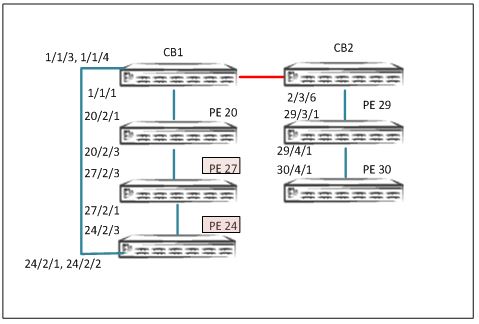
In the following example, two PEs in the reference topology, PE 24 and PE 27, are replaced.
- Check the current topology, and save the configuration.
SPX# show spx T=12m21.0: alone: standalone, D: dynamic cfg, S: static ID Type Role Mac Address Pri State Comment 1 S ICX7750-48XGF standby 609c.9f1f.9900 128 remote Ready 2 S ICX7750-48XGF active cc4e.246d.9b00 128 local Ready 20 D ICX7450-48GF spx-pe cc4e.246d.10b8 N/A remote Ready 24 D ICX7450-48G spx-pe cc4e.248e.2f90 N/A remote Ready 27 D ICX7450-48GF spx-pe cc4e.246c.f850 N/A remote Ready 29 S ICX7450-24G spx-pe cc4e.248b.ac90 N/A remote Ready 30 S ICX7450-24G spx-pe cc4e.248b.a8a8 N/A remote Ready active standby +---+ +---+ | 2 |2/4--2/1| 1 |2/4 +---+ +---+ +----+ +----+ +----+ 1/1/1--2/1| 20 |2/3--2/3| 27 |2/1--2/3| 24 |2/1==1/1/3 +----+ +----+ +----+ +----+ +----+ 2/3/6--3/1| 29 |4/1--4/1| 30 | +----+ +----+ SPX# write memory Send "write mem" to 5 PEs: 20, 24,27,29-30 ==================save configuration - Verify the topology using the
show running-configcommand.SPX# show running-config Current configuration: ! ver 08.0.50b1T203 ! stack unit 1 module 1 icx7750-48-xgf-port-management-module module 2 icx7750-qsfp-6port-qsfp-240g-module priority 128 stack-port 1/2/1 1/2/4 stack unit 2 module 1 icx7750-48-xgf-port-management-module module 2 icx7750-qsfp-6port-qsfp-240g-module module 3 icx7750-6q-6port-qsfp-240g-module priority 128 stack-port 2/2/4 spx unit 20 module 1 icx7450-48f-sf-port-management-module module 2 icx7400-xgf-4port-40g-module module 3 icx7400-xgf-4port-40g-module module 4 icx7400-xgf-4port-40g-module spx-port 20/2/1 spx-port 20/2/3 spx unit 24 module 1 icx7450-48-port-management-module module 2 icx7400-xgf-4port-40g-module module 3 icx7400-qsfp-1port-40g-module module 4 icx7400-qsfp-1port-40g-module spx-lag 24/2/1 to 24/2/2 spx-port 24/2/3 spx unit 27 module 1 icx7450-48f-sf-port-management-module module 2 icx7400-xgf-4port-40g-module module 3 icx7400-qsfp-1port-40g-module module 4 icx7400-qsfp-1port-40g-module spx-port 27/2/1 spx-port 27/2/3 spx unit 29 module 1 icx7450-24-port-management-module module 2 icx7400-qsfp-1port-40g-module module 3 icx7400-qsfp-1port-40g-module module 4 icx7400-qsfp-1port-40g-module spx-port 29/3/1 spx-port 29/4/1 spx unit 30 module 1 icx7450-24-port-management-module module 2 icx7400-qsfp-1port-40g-module module 3 icx7400-qsfp-1port-40g-module module 4 icx7400-qsfp-1port-40g-module spx-port 30/4/1 stack enable stack rconsole-off stack mac 609c.9f1f.9900 ! spx cb-enable spx cb-configure spx-port 1/1/1 spx-port 2/3/6 spx-lag 1/1/3 to 1/1/4 zero-touch-ports 1/2/6 pe-id 1/1/1 20 27 24 1/1/3 ==================(PEs in this ring will be replaced) pe-id 2/3/6 29 30 !
- Units 24 and 27 no longer appear in the topology. These are the units being replaced.
SPX# show spx T=16m0.6: alone: standalone, D: dynamic cfg, S: static ID Type Role Mac Address Pri State Comment 1 S ICX7750-48XGF standby 609c.9f1f.9900 128 remote Ready 2 S ICX7750-48XGF active cc4e.246d.9b00 128 local Ready 20 S ICX7450-48GF spx-pe cc4e.246d.10b8 N/A remote Ready 24 S ICX7450-48G spx-pe 0000.0000.0000 N/A reserve ======================units lost 27 S ICX7450-48GF spx-pe 0000.0000.0000 N/A reserve ======================units lost 29 S ICX7450-24G spx-pe cc4e.248b.ac90 N/A remote Ready 30 S ICX7450-24G spx-pe cc4e.248b.a8a8 N/A remote Ready active standby +---+ +---+ | 2 |2/4--2/1| 1 |2/4 +---+ +---+ +----+ 1/1/1--2/1| 20 |2/3- +----+ +----+ +----+ 2/3/6--3/1| 29 |4/1--4/1| 30 | +----+ +----+ - Replace PE 24 and 27 with matching units, and reconnect the replacements.
- Run the SPX interactive-setup utility to discover the replacement PE units. Once
the units are discovered, you are prompted for PE IDs. Retain the PE IDs. The topology
is displayed again for confirmation. When you confirm the topology, the full topology,
including the replacement PE units, is displayed.
SPX# spx interactive-setup You can abort spx interactive-setup at any stage by <ctrl-c> 0: quit 1: change PE IDs 2: discover and convert new units (no startup-config flash) to PEs 3: discover and convert existing/new standalone units to PEs Please type your selection: 2 Probing topology to find new units... Horizontal bars link to discovered units. Vertical bars link to CB or PEs. Chain #0: link to PE(s), so display PE chain(s). ============================= #1: icx7450-48f-sf-port-management-module CC4E.246C.F850 #2: icx7450-48-port-management-module CC4E.248E.2F90 +----+ 1/1/1--2/1| 20 |2/3- +----+ 20/2/3 1/1/3 | || | || 2/3 2/1 +----+ +----+ | 1 |2/1--2/3| 2 | +----+ +----+ Discovered 1 chain/ring chain #0: Do you want to select this chain?(enter 'y' or 'n'): y #2: icx7450-48-port-management CC4E.248E.2F90, type an ID (No: 0, default: 24): same ids will be given #1: icx7450-48f-sf-port-management CC4E.246C.F850, type an ID (No: 0, default: 27): You selected 2 unit(s): #1: ID=27, #2: ID=24, #1 #2 +----+ +----+ +----+ 1/1/1--2/1| 20 |2/3--2/3| 27 |2/1--2/3| 24 |2/1==1/1/3 +----+ +----+ +----+ Proceeding will produce the above topology. Do you accept it? (enter 'y' or 'n'): y spx interactive-setup discovers 1 chain(s). valid #=1, selected #=1 - The replacement PEs reload and join the Campus Fabric domain. Use the
show spxcommand to verify the operational state of the PEs, and then save the configuration.T=12m21.0: alone: standalone, D: dynamic cfg, S: static ID Type Role Mac Address Pri State Comment 1 S ICX7750-48XGF standby 609c.9f1f.9900 128 remote Ready 2 S ICX7750-48XGF active cc4e.246d.9b00 128 local Ready 20 D ICX7450-48GF spx-pe cc4e.246d.10b8 N/A remote Ready 24 D ICX7450-48G spx-pe cc4e.248e.2f90 N/A remote Ready 27 D ICX7450-48GF spx-pe cc4e.246c.f850 N/A remote Ready 29 S ICX7450-24G spx-pe cc4e.248b.ac90 N/A remote Ready 30 S ICX7450-24G spx-pe cc4e.248b.a8a8 N/A remote Ready active standby +---+ +---+ | 2 |2/4--2/1| 1 |2/4 +---+ +---+ +----+ +----+ +----+ 1/1/1--2/1| 20 |2/3--2/3| 27 |2/1--2/3| 24 |2/1==1/1/3 +----+ +----+ +----+ +----+ +----+ 2/3/6--3/1| 29 |4/1--4/1| 30 | +----+ +----+ SPX# write memory Send "write mem" to 5 PEs: 20,24,27,29-30 ==================save configuration - Once the topology is active, verify the CSP operational state using the
show spx csp allcommand, and confirm that the handshake is complete. If there is a ring in the topology, verify the ring operational state using theshow spx ring allcommand.Note: There are no specific
showcommands for ZTP. All commands that apply to SPX also apply to ZTP. Refer to Debugging and Verification Commands.