Deployment Scenario 5: Preventing an ICX 7250 or ICX 7450 from Being Discovered by Zero-Touch
Any network may contain switches that should not join the Campus Fabric domain. The
spx zero-touch-deny command can be configured on any traditional stack member or standalone device to
prevent the unit from being converted to a PE unit accidentally by the zero-touch
or SPX interactive-setup utility.
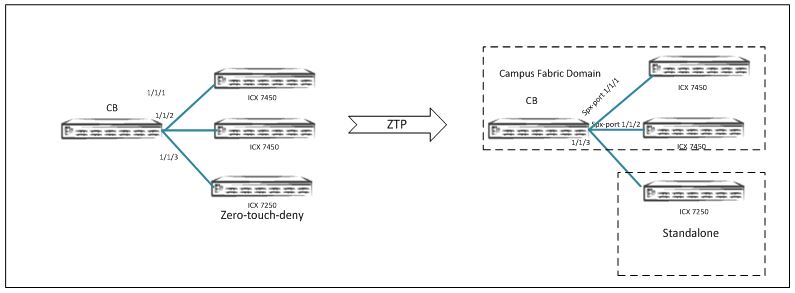
-
Configure
spx zero-touch-denyin global configuration mode on a standalone unit. -
To make units available for discovery again, enter the
no zero-touch-denycommand. Thezero-touch enableor thespx pe-enablecommand also removes thespx zero-touch-denysetting.
The following example protects an ICX 7450 from being discovered by a CB unit when the zero-touch utility or SPX interactive-setup utility is run.
ICX7450-48F Router>
ICX7450-48F Router> enable
No password has been assigned yet...
ICX7450-48F Router# configure terminal
ICX7450-48F Router(config)# spx zero-touch-deny
ICX7450-48F Router(config)# show running-config
Current configuration:
!
ver 08.0.50b1T213
!
stack unit 1
 module 1 icx7450-48f-sf-port-management-module
 module 2 icx7400-xgf-4port-40g-module
 module 4 icx7400-qsfp-1port-40g-module
!
spx zero-touch-deny
!