Debugging and Verification Commands
Once the SPX domain is formed, you can use
show commands to verify that the SPX is operational.
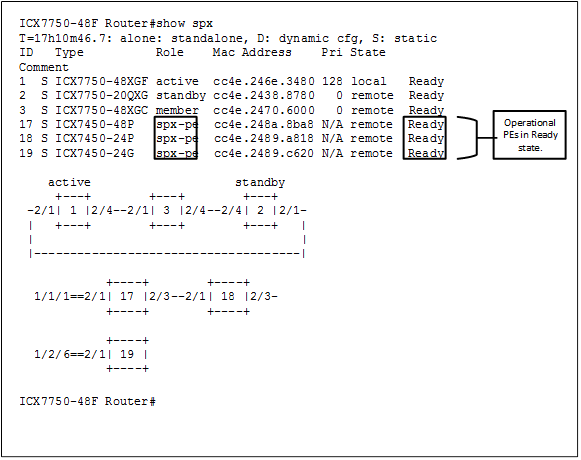
The
show spxcommand on the CB displays the CB stack and PE unit/PE chain with a cascade port.A PE in operational mode is seen in the "Ready" state.
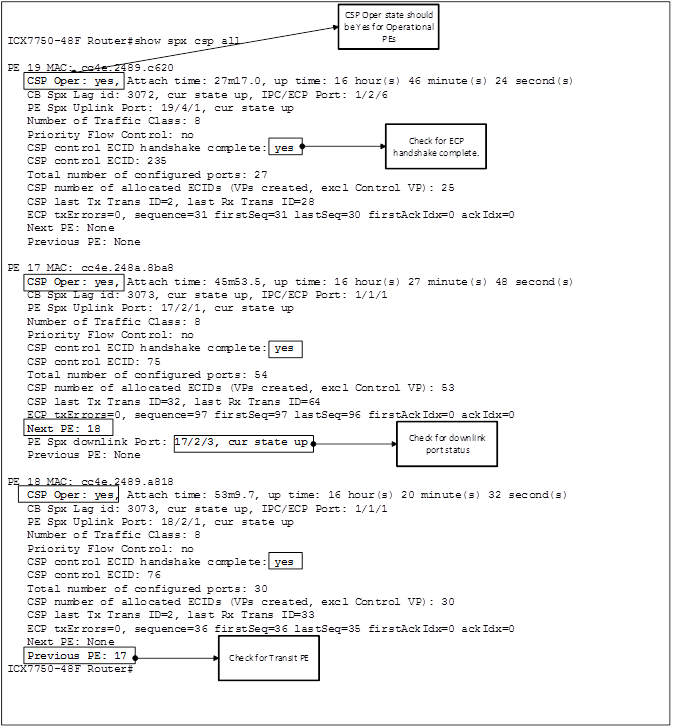
The
show spx csp allcommand can be used to indicate how far the CSP went forward.CSP Oper status "Yes" shows that CSP is operational and that the PE is attached and operational.
CSP Oper status "No" indicates that the PE is not correctly attached to the CB.
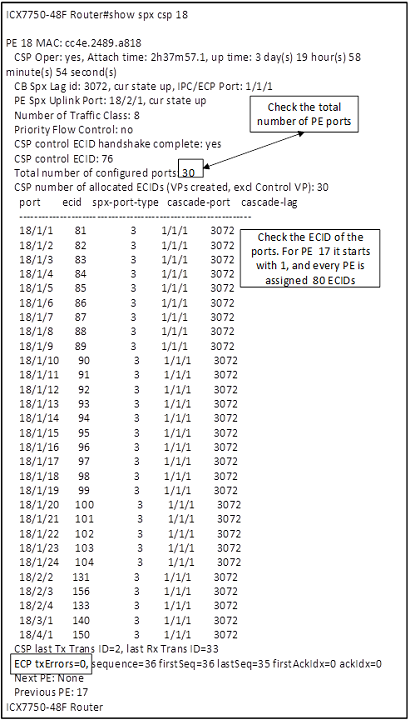
The
show spx csp unit-id command can be used to see whether VP port creation succeeded and whether the ECID
is assigned to all PE ports.
Example show Commands on the PE
[PE]local-17@ICX7450-48P Router# show running-config
Current configuration:
!
ver 08.0.40bT213
!
spx pe-enable
spx unit 17
  module 1 icx7450-48p-poe-management-module
  module 2 icx7400-xgf-4port-40g-module
  module 3 icx7400-qsfp-1port-40g-module
  module 4 icx7400-qsfp-1port-40g-module
  spx-lag 17/2/1 to 17/2/2
  spx-port 17/2/3
!
end

[PE]local-17@ICX7450-48P Router# show spx csp all

   CSP Oper: yes, Attach time: 1m5.1, up time: 16 hour(s) 31 minute(s) 27 second(s)
   PE Spx Lag id: 1, cur state up, IPC/ECP Port: 17/2/1
   Number of Traffic Class: 8
   Priority Flow Control: no
   CSP control ECID handshake complete: yes
   CSP control ECID: 75
   Total number of configured ports: 54
   CSP number of create port requests sent: 54
   CSP last Tx Trans ID=64, last Rx Trans ID=32
   ECP txErrors=0, sequence=97 firstSeq=97 lastSeq=96 firstAckIdx=0 ackIdx=0
   Next PE: None
   Previous PE: None
[PE]local-17@ICX7450-48P Router#

[PE]local-18@ICX7450-24P Router# show running-config
Current configuration:
!
ver 08.0.40bT213
!
spx pe-enable
spx unit 18
  module 1 icx7450-24p-poe-port-management-module
  module 2 icx7400-xgf-4port-40g-module
  module 3 icx7400-qsfp-1port-40g-module
  module 4 icx7400-qsfp-1port-40g-module
  spx-port 18/2/1
  spx-port 18/2/3
!
end

[PE]local-18@ICX7450-24P Router# show spx csp all

   CSP Oper: yes, Attach time: 40.4, up time: 16 hour(s) 24 minute(s) 19 second(s)
   PE Spx Lag id: 1, cur state up, IPC/ECP Port: 18/2/1
   Number of Traffic Class: 8
   Priority Flow Control: no
   CSP control ECID handshake complete: yes
   CSP control ECID: 76
   Total number of configured ports: 30
   CSP number of create port requests sent: 30
   CSP last Tx Trans ID=33, last Rx Trans ID=2
   ECP txErrors=0, sequence=36 firstSeq=36 lastSeq=35 firstAckIdx=0 ackIdx=0
   Next PE: None
   Previous PE: None

[PE]local-19@ICX7450-24 Router# show running-config
Current configuration:
!
ver 08.0.40bT213
!
spx pe-enable
spx unit 19
  module 1 icx7450-24-port-management-module
  module 2 icx7400-qsfp-1port-40g-module
  module 3 icx7400-qsfp-1port-40g-module
  module 4 icx7400-qsfp-1port-40g-module
  spx-lag 19/2/1 19/3/1 19/4/1
!
end

[PE]local-19@ICX7450-24 Router# show spx csp all

   CSP Oper: yes, Attach time: 30.1, up time: 16 hour(s) 49 minute(s) 9 second(s)
   PE Spx Lag id: 1, cur state up, IPC/ECP Port: 19/4/1
   Number of Traffic Class: 8
   Priority Flow Control: no
   CSP control ECID handshake complete: yes
   CSP control ECID: 235
   Total number of configured ports: 27
   CSP number of create port requests sent: 27
   CSP last Tx Trans ID=28, last Rx Trans ID=2
   ECP txErrors=0, sequence=31 firstSeq=31 lastSeq=30 firstAckIdx=0 ackIdx=0
   Next PE: None
   Previous PE: None
[PE]local-19@ICX7450-24 Router#
Example show Commands on the CB Stack (To Check Stack Stability)
ICX7750-48F Router# show stack
T=17h11m34.9: alone: standalone, D: dynamic cfg, S: static
ID   Type          Role    Mac Address    Pri State   Comment
1  S ICX7750-48XGF active  cc4e.246e.3480 128 local   Ready
2  S ICX7750-20QXG standby cc4e.2438.8780   0 remote  Ready
3  S ICX7750-48XGC member  cc4e.2470.6000   0 remote  Ready

    active                    standby
     +---+        +---+        +---+
 -2/1| 1 |2/4--2/1| 3 |2/4--2/4| 2 |2/1-
 |   +---+        +---+        +---+   |
 |                                     |
 |-------------------------------------|
Standby u2 - protocols ready, can failover
Current stack management MAC is cc4e.246e.3480

There are 3 PEs. Please use "show spx" to display PE information.

ICX7750-48F Router# show stack con
Probing the topology. Please wait ...
ICX7750-48F Router#
    active                    standby
     +---+        +---+        +---+
 -2/1| 1 |2/4--2/1| 3 |2/4--2/4| 2 |2/1-
 |   +---+        +---+        +---+   |
 |                                     |
 |-------------------------------------|

trunk probe results: 3 links
Link 1: u1 -- u2, num=1
  1: 1/2/1 (P0) <---> 2/2/1 (P0)
Link 2: u1 -- u3, num=1
  1: 1/2/4(P1) <---> 3/2/1 (P0)
Link 3: u2 -- u3, num=1
  1: 2/2/4(P1) <---> 3/2/4(P1)
CPU to CPU packets are fine between 3 units.
ICX7750-48F Router#
ICX7750-48F Router#
ICX7750-48F Router# show stack de
T=17h11m50.0: alone: standalone, D: dynamic cfg, S: static
ID   Type          Role    Mac Address    Pri State   Comment
1  S ICX7750-48XGF active  cc4e.246e.3480 128 local   Ready
2  S ICX7750-20QXG standby cc4e.2438.8780   0 remote  Ready
3  S ICX7750-48XGC member  cc4e.2470.6000   0 remote  Ready

    active                    standby
     +---+        +---+        +---+
 -2/1| 1 |2/4--2/1| 3 |2/4--2/4| 2 |2/1-
 |   +---+        +---+        +---+   |
 |                                     |
 |-------------------------------------|
Standby u2 - protocols ready, can failover
Current stack management MAC is cc4e.246e.3480

Image-Auto-Copy is Enabled.

      Stack Port Status                  Neighbors
Unit# Stack-port1        Stack-port2     Stack-port1     Stack-port2
1     up (1/2/1)         up (1/2/4)      U2 (2/2/1)      U3 (3/2/1)
2     up (2/2/1)         up (2/2/4)      U1 (1/2/1)      U3 (3/2/4)
3     up (3/2/1)         up (3/2/4)      U1 (1/2/4)      U2 (2/2/4)

Unit# System uptime
1     17 hour(s) 11 minute(s) 50 second(s)
2     16 hour(s) 53 minute(s) 37 second(s)
3     16 hour(s) 53 minute(s) 41 second(s)
The system started at 15:59:15 Pacific Mon Dec 14 2015

ICX7750-48F Router#
For more information about SPX debugging, refer to the "SPX Troubleshooting" section of the Ruckus FastIron Switch Port Extender Configuration Guide.