Migrating a Linear Stack to the Campus Fabric Domain
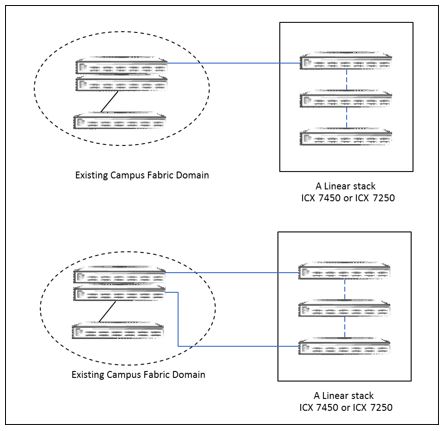
Use Case 1: Migrating an existing linear stack to PEs in a linear topology
Use Case 2: Migrating an existing linear stack to PEs in a ring topology
The CB and the existing stack must be properly cabled.
The existing linear stack can be cabled to deploy either a linear PE topology or a ring PE topology.
On the active controller of the stack to be converted to PEs, erase the startup configuration and reload.
On the CB, run the SPX interactive-setup utility for this deployment scenario.
Default PE IDs are displayed, and you are given the opportunity to accept the default IDs or change them.
The discovered units reload, and the stack units become PE units in the Campus Fabric domain.
Once the topology is active, verify the CSP operational state using the
show spx csp allcommand, and confirm that the handshake is complete. If there is a ring in the topology, verify the ring operational state using theshow spx ring allcommand.
Note: Zero-touch or SPX interactive-setup works only if you erase the startup configuration on the existing stack units before attempting to convert them to PE units.
A two-unit ICX 7450 linear stack is cabled to the CB, and the stack units need to be converted to PE units.
- Once the units are properly cabled to the CB, erase the startup configuration and reload the stack.
- Run the SPX interactive-setup utility on the CB. The discovered topology is displayed, and you are prompted to accept or change default PE ID assignments.
- Once you confirm the topology with selected PE IDs, the units reload and join the
Campus Fabric domain.
# spx interactive-setup
You can abort spx interactive-setup at any stage by <ctrl-c>
0: quit
1: change PE IDs
2: discover and convert new units (no startup-config flash) to PEs
3: discover and convert existing/new standalone units to PEs
Please type your selection: 2
Probing topology to find new units...

Horizontal bars link to discovered units. Vertical bars link to CB or PEs.


Discovered 1 chain/ring, display chain #0 for processing
#1: icx7450-48f-sf-port-management-module CC4E.246C.F850
#2: icx7450-48f-sf-port-management-module CC4E.246D.10B8

   2/1/4         1/1/3
     |             |
     |             |
    2/1           2/1
  +----+        +----+
  | 1  |3/1--3/1| 2 |
  +----+        +----+
chain #0: Do you want to select this chain?(enter 'y' or 'n'): y #1: icx7450-48f-sf-port-management CC4E.246C.F850, type an ID (No: 0, default: 17): #2: icx7450-48f-sf-port-management CC4E.246D.10B8, type an ID (No: 0, default: 18): 2 unit(s) selected: #1: ID=17, #2: ID=18, #2 #1 +----+ +----+ 1/1/3--2/1| 18 |3/1--3/1| 17 |2/1--2/1/4 +----+ +----+ Will produce the above topology. Do you accept it? (enter 'y' or 'n'): y