Zero-Touch Features
When zero-touch is enabled on the CB, probe packets are sent from eligible ports to check the topology for potential PE candidates.
Any of the following ports may be SPX or ZTP probe ports for discovering new units:
-
Configured zero-touch ports or a range of zero-touch ports.
-
CB SPX ports or SPX LAGs that are not live and that are not attached to existing PE units.
-
A downstream SPX port or SPX LAG on an edge PE unit.
-
All nonbase module ports of an edge PE (all ports from modules 2, 3, and 4 of an edge PE).


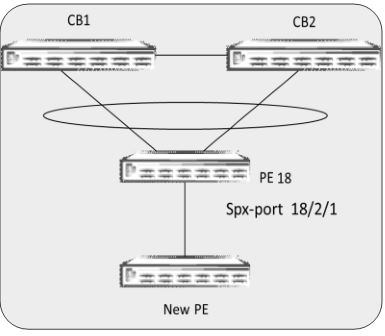

SPX or ZTP probes for new units cannot be sent over the following ports, and attached units will not be discovered:
-
Live SPX ports or SPX LAGs (whether the live ports are on a CB or PE unit)
-
Any port that contains configuration
Zero-touch is capable of automatically generating SPX LAGs and SPX ports when a new PE unit is added through configured zero-touch port ranges.
Configured zero-touch-ports range: 1/1/1 to 1/1/10
Detected ports by zero-touch between CB-PE 1: 1/1/1 to 1/1/2, CB–PE 2: 1/1/4
ZTP-generated SPX LAGs and SPX ports: spx-lag 1/1/1 to 1/1/2, spx-port 1/1/4
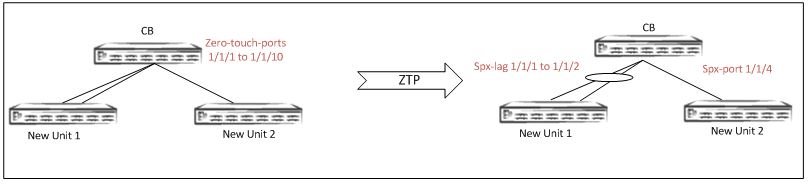
Note: If ports are planned for dedicated use in a Campus Fabric domain, configure the ports as SPX LAGs or SPX ports rather than zero-touch ports. The zero-touch utility splits the ports into separate SPX LAGs as needed during the discovery process. This method avoids looping of packets, which causes high CPU utilization. Refer to Zero-Touch Deployment Considerations for more information.
Auto-LAG Capability with Zero-Touch
For a PE candidate to join the Campus Fabric domain, both ends of the PE candidate's links must be SPX ports or SPX LAGs. A PE candidate's SPX port or SPX LAG is created when it receives related information from the CB before it is reloaded as a PE. The CB must create the corresponding new SPX port or SPX LAG on the CB or on an edge PE so that the new SPX port or SPX LAG on the CB or existing PE matches the joining PE candidate.
The new SPX port or SPX LAG is formed from detected links connected to a PE candidate. The detected links could be an existing SPX port or SPX LAG, zero-touch ports on a CB, or an SPX port or SPX LAG on a nonbase module on an edge PE.
If no corresponding SPX LAG or SPX port exists, a new SPX port or SPX LAG is created. If the new SPX port or SPX LAG has any ports that overlap with an existing SPX port or SPX LAG, the existing SPX port or SPX LAG is removed, and a new SPX port or SPX LAG is created. The ports in the removed SPX port or SPX LAG become data ports.
Note: If a previously configured SPX LAG differs from the ZTP-detected LAG and overlaps with it, the Auto-LAG utility deletes the previous LAG and creates a new LAG.
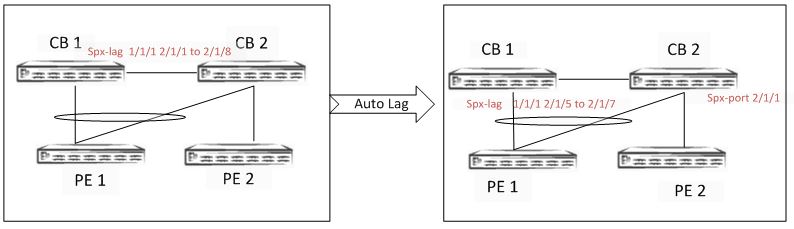
In this figure, 2/1/5 to 2/1/8 is represented as one link.
Modifying a Live Link with Zero-Touch
Zero-touch does not support the following functions:
-
Changing live SPX ports or SPX LAGs: Once a new PE unit has been added and has joined the Campus Fabric domain, zero-touch does not manipulate existing SPX ports or SPX LAGs.
SPX LAGs can be converted to SPX ports and vice versa only through manual configuration.
-
Discovering new links on an existing live SPX LAG: When more links are added to an SPX LAG that already exists between the CB and a PE or between two PE units, zero-touch does not discover the additional links on the live SPX LAG.
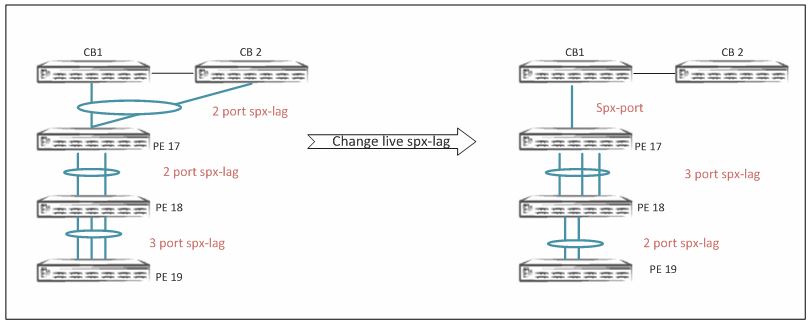
Note: Refer to
Deployment Scenario 6: Adding More Links to a Live SPX Link Using the multi-spx-lag
Command and Deployment Scenario 7: Removing Links from a Live SPX LAG and Converting the LAG to
an SPX Port for information on using the multi-spx-port and
multi-spx-lag commands for making changes to a live SPX link.