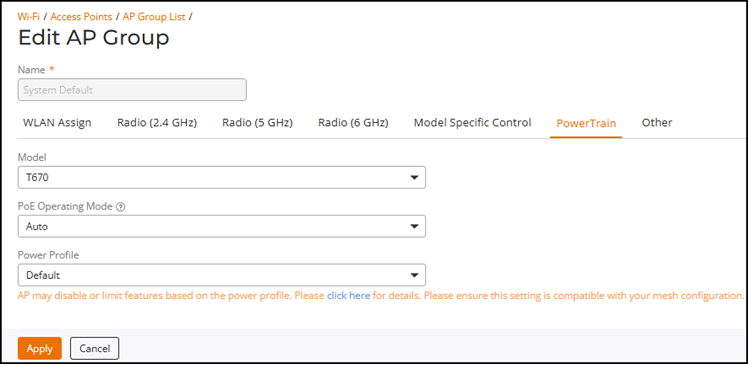
PowerTrain
- Model: Select an AP model from the drop-down list.
- PoE Operating Mode:
Specifies how the access point detects, negotiates, and operates with the available
input power from the connected power source. The available PoE operating modes
depend on the AP model and its power capabilities. Selecting a lower PoE mode may
limit available features to reduce power consumption, while higher PoE modes enable
additional functionality but require a compatible power source.
Select the PoE operating mode: Auto, 802.3af PoE, 802.3at PoE, PoE, 802.3bt/Class 5, 802.3bt/Class 6, and 802.3bt/Class 7 (some modes are for specific APs only). The default is Auto. If 802.3af PoE is selected, the AP operates in 802.3af mode (not 802.3at mode), and consumes less power than in 802.3at mode. However, when this option is selected, some AP features are disabled to reduce power consumption, such as the USB port and one of the Ethernet ports.
Note: On some APs, an additional mode, 802.3at+ PoE, is available. This mode enables all features on the AP but requires an Ethernet switch that supports the 802.3at+ standard due to the higher power draw from the port to which the AP is connected.For a list of PoE operating modes by AP model, refer to Access Point Power Supply Considerations.
- Power Profile:
Specifies the Administrator Option Power Profile (AOPP) applied to the AP model (for
example, R575 and T670). This setting controls how the AP uses available power by
enabling, disabling, or limiting features based on the selected power profile.
Select a Power Profile from the drop-down list, such as Default or model-specific AOPP profiles (for example, AOPP_T670_802.3atC4_01). The applied Power Profile depends on the detected PoE power source. If the configured Power Profile cannot be applied, the system falls back to the default power configuration.
Note: Ensure that the selected Power Profile is compatible with mesh configuration and radio settings. Some configurations may prevent the Power Profile from being applied, and the system reverts to the default profile.