Viewing the Network Configuration

You can view the configuration details of the network managed by remote management services for Unleashed.
  1. After you log in to the remote management service web interface, select Networks from the main menu.

    The Networks page of the web interface displays information about networks managed by remote management services for Unleashed.

    Viewing Network Configuration Details for a Managed Unleashed Network

    Network Configuration Details

    Tab Description
    General

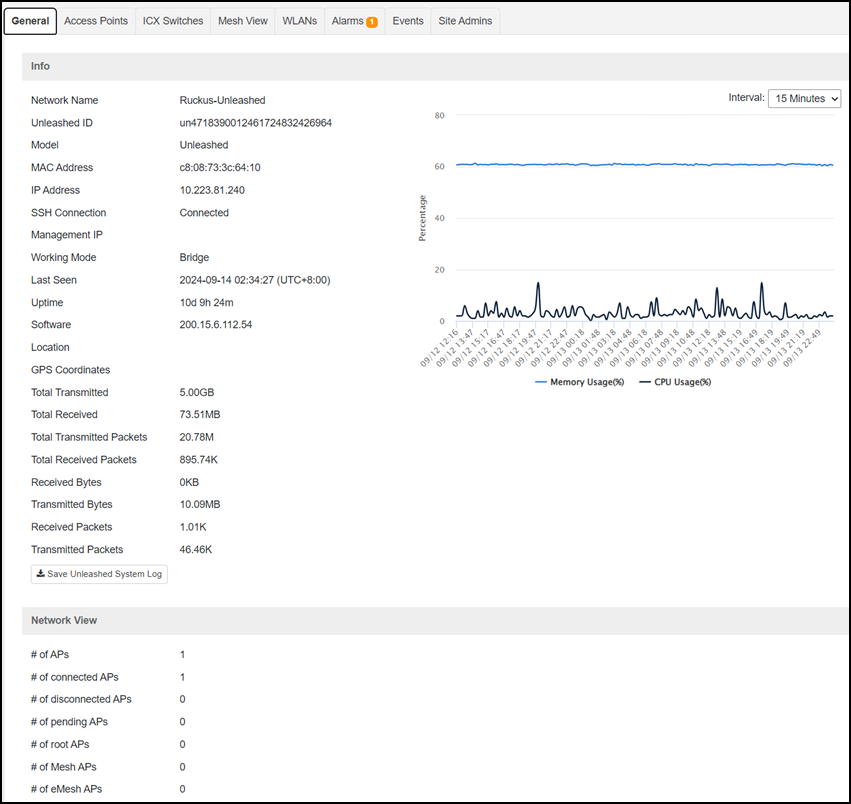
    Displays the following information:

    • Info: Provides basic network information including the number of data bytes and packets transmitted and received by the network. Click Save Unleashed System Log to save the Unleashed system log. A time-series graph displays the CPU and memory usage of the Unleashed master AP. You can modify the data collection periods by using the Interval drop-down menu.
    • Network View: Provides detailed information about the APs associated with the network.

    Access Points Displays a table with detailed information about the APs associated with the network, such as the number of authorized clients associated with the AP, software version, model number, uptime, IP address, and current status of the AP.

    For an Unleashed network, the AP Role is also displayed: Master or Member. Every Unleashed network has one master AP and several member APs that are managed by the master AP. The APs are displayed in a tree structure. In addition, the page displays general properties of the AP.

    ICX Switches

    Displays a table detailing information about the Unleashed managed ICX switching, including name, network name, MAC address, port status, serial number, connection, management IP, model, last seen, uptime, and software. The ICX Switches tab also offers backup or restore and upgrading options.

    Mesh View

    Displays a table that lists the mesh details of the network, such as the mesh topology, signal strength, MAC address, IP address, access points, channel used, and number of authorized clients.

    WLANs

    Displays a table that lists the WLANs configured on the network, including the WLAN names, ESSIDs, authentication and encryption methods, and the number of clients associated with each WLAN, status, background scan, VLAN ID, and the Tx/Rx of bytes and packets.

    Alarms Displays a table that lists information about the type of alarm that was triggered which includes the time, alarm type, network name, the severity, and the activity associated with the alarm.
    Events Displays a table that lists information about the event that was triggered including the event time, severity, the event type, activity and the network name associated with the event.
    Site Admins Displays the email ID, name, and last login details of the Site Admins.

    Click the icon to refresh the contents of the tables within the tabs. You can also customize the tables by clicking the icon. You can also use the Search field to look for specific information within the tables.