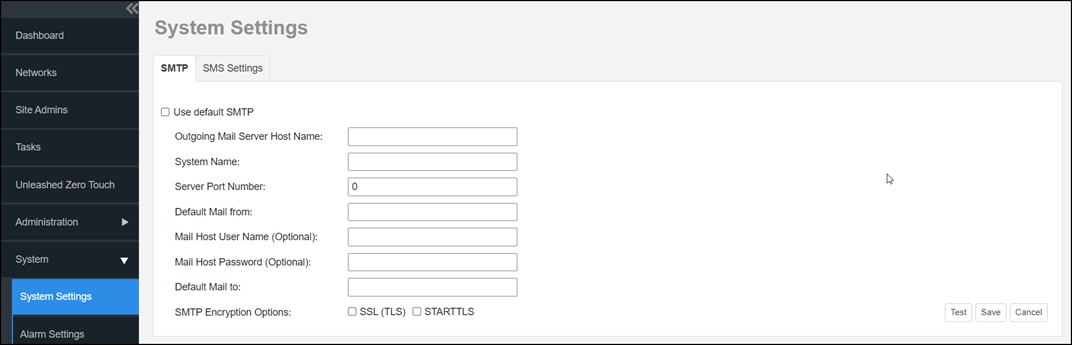
Configuring SMTP Settings
You must configure the remote management services host server to enable it to send email notifications. For example, the Audit Log and System Log menu items offer email options. When sending logs via email, the entire contents of these log files are sent to the preconfigured recipient (Default Mail To) specified on the SMTP Settings page.
- Go to .
- Click the SMTP. Note: The remote management services for Unleashed has its own default SMTP server.
Brand Admins and Domain Admins have the option to configure their own SMTP server or use the default SMTP server.
- For Outgoing Mail Server Host Name, type the hostname of the outgoing SMTP server.
- (Optional) For System Name field, enter a new name for the server.
- In the Server Port Number, type the SMTP server’s listening port
number. Note: If you select SSL (TLS) or STARTTLS SMTP Encryption Options, you must check the SMTP hostname and port number with the SMTP service provider and configure remote management services for Unleashed accordingly. For example, the Gmail server uses 587 as its STARTTLS port and 465 as the SSL (TLS) port, and the QQ server uses 25 as its non-SSL port and 465 as its TLS port.
If your port number and protocol settings do not match, emails cannot be sent successfully. For example, testing will fail if you select port 25 and STARTTLS for a QQ server. Emails do not automatically revert to the non-TLS protocol.
- In the Default Mail from field, type the email address that appears as the email's sender.
- (Optional) For Mail Host User Name, type the SMTP user name for the email account that you are using to send email notifications.
- (Optional) For Mail Host Password, type the SMTP password for the email account.
- (Optional) For Default Mail to, type the user's email address to whom you want to send email notifications. Note that the system uses this recipient address when sending logs via email for troubleshooting.
- In SMTP Encryption Options:
- Click Test to verify that the remote management services can use the SMTP settings you configured to send email notifications. If an error appears, check your settings and update them as necessary.
- Click the Save button to save the SMTP configuration.