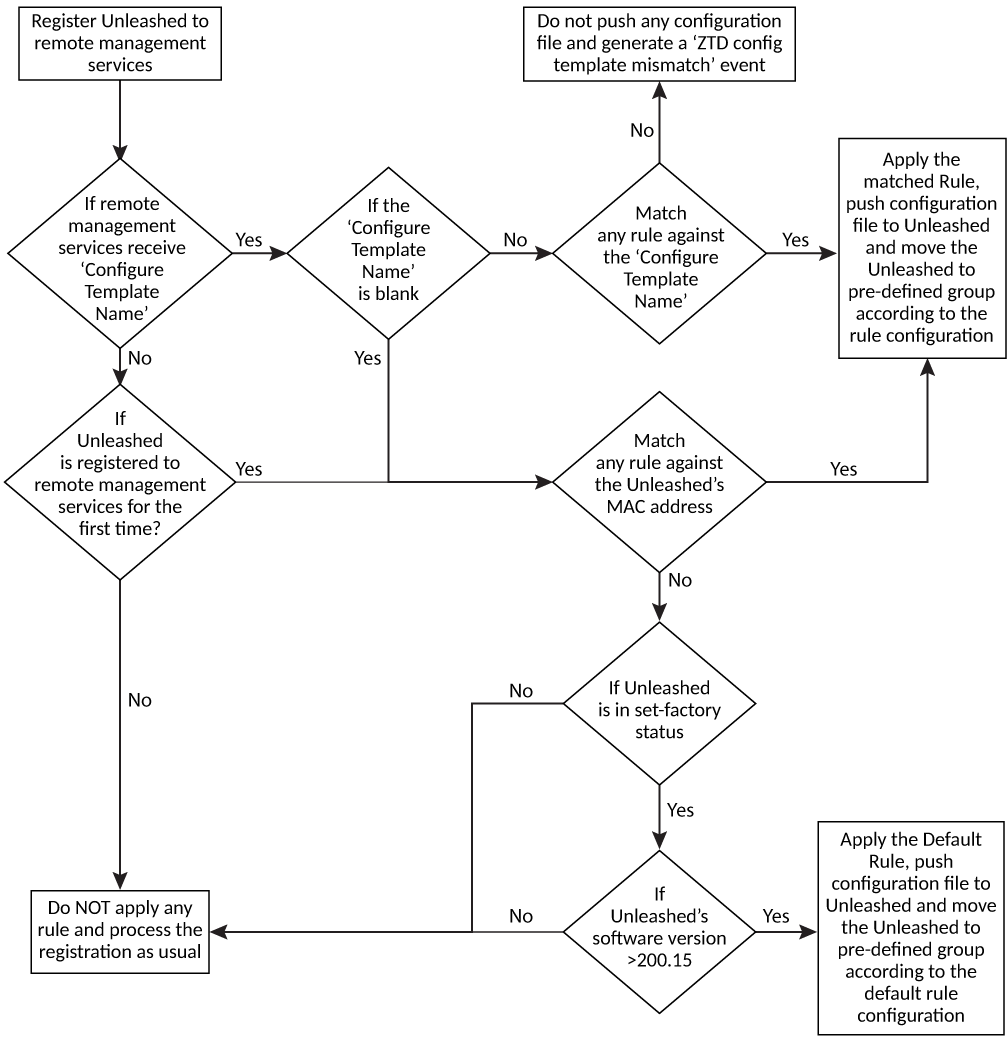
Unleashed Zero Touch Deployment Workflow
Zero Touch Deployment Workflow
- Registering Unleashed to remote management services: When registering Unleashed to remote management services, you can choose to provision the remote management services IP to Unleashed during the setup wizard. This can be done either manually or automatically through the DHCP server option 43.
- The remote management services for Unleashed checks for the 'Configure Template Name' parameter when it receives the registration message from Unleashed. You have the flexibility to provision this name during the wizard setup, either manually or automatically using the DHCP server option 43. The 'Configure Template Name' is optional. If you do not provision this parameter, Unleashed sends a blank 'Configure Template Name' to remote management services for Unleashed.
- The remote management services for Unleashed matches the Zero Touch Deployment rule against the 'Configure Template Name.'
- If remote management services for Unleashed does not find any matching Zero Touch Deployment rule, it will stop the deployment and generate a 'ZTD config template mismatch' event as a reminder. Unleashed will then retry the registration after the timeout.
- If remote management services for Unleashed finds a rule containing the same 'Configure Template Name,' it will push the configuration file to Unleashed and move it to a pre-defined group according to the configuration of the Zero Touch Deployment rule.
- The remote management services checks if the Unleashed network is being registered to remote management services for the first time.
- The remote management services matches the Zero Touch Deployment rule against the Unleashed AP's MAC address. This applies only to the Unleashed network registering to remote management services for the first time. For example, if the Unleashed network has already registered to remote management services, and then the customer restarts the Unleashed AP after start-up, the Unleashed network will register to remote management services again, but remote management services will not apply the Zero Touch Deployment rule to the Unleashed device since it is not the first-time registration.
- The remote management services for Unleashed also checks if the Unleashed device is in set-factory status.
- The remote management services for Unleashed applies the Default Rule to the Unleashed that is NOT in set-factory status to avoid unintentional deployment. For example, if Unleashed is not in set-factory status, which means it has the setup already, then in this case, we do not deploy the default configuration file to Unleashed to avoid any mistake.
- The remote management services for Unleashed does not apply any Zero Touch Deployment rule and processes the registration as usual.