Managing Alarm Events and Notifications
Complete the following steps to manage alarm events and notifications settings.
- On the menu, go to
Admin >
Alarms.
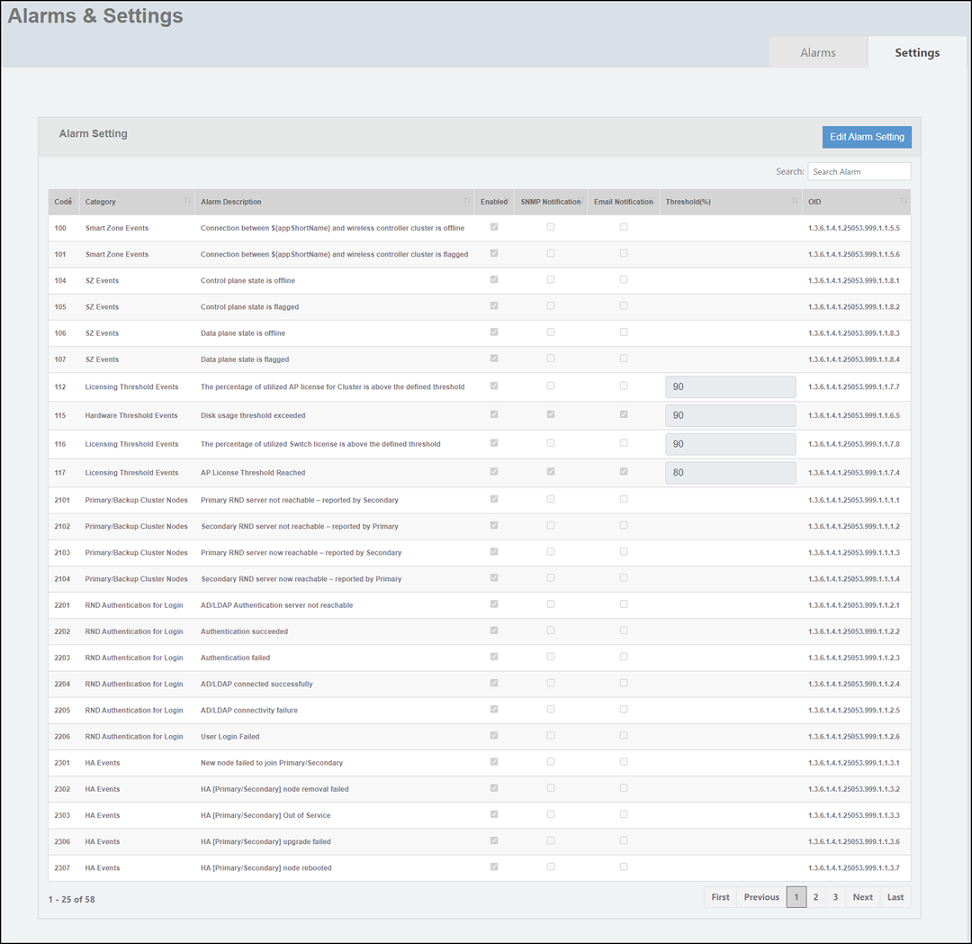
The Alarms & Settings window is displayed.
- In the Alarms & Settings window, select the Settings tab.
- Click Edit Alarm
Setting. The Alarm Setting
panel becomes editable, allowing you to make changes.
The following alarm setting parameters are available:
- Code: Displays the alarm code.
- Category: Displays the event category.
- Alarm Description: Provides a brief description of each alarm event.
- Enabled: If selected, alarm will be enabled for the selected events. By default, all the listed alarm events are enabled.
- SNMP Notification:
Allows you to enable or disable SNMP notification for specific traps.
Note: Ensure that SNMP setting is enabled in the SNMPv2 Agent Setting panel to globally activate SNMP notification. For more information, refer to Configuring the SNMPv2 Agent.
- Email Notification: Allows you to enable or disable email notification for specific alarm events.
- Threshold(%): This parameter is available only for license events, AP events, and hardware events. The default threshold value is 90%. The threshold percentage can be set between a value from 1 through 100.
- OID: Displays the Object Identifier (OID) used in SNMP to uniquely identify managed objects.
- Click Update to apply the changes.