Scheduling Database Backup
- Go to .
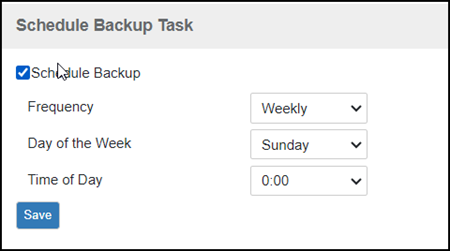
- Look for the Schedule Backup Task section.
- Select the Schedule Backup checkbox.
- In Frequency, specify how often you want the software to automatically back up the database. Options include Daily, Weekly, and Monthly.
- Configure additional options for the
Frequency option that you clicked.
- If you clicked Daily, then set the Time of Day when you want the software to back up the database.
- If you clicked Weekly, then set the Day of the Week and Time of Day when you want the software to back up the database.
- If you clicked Monthly, then set the Day of the Month and Time of Day when you want the software to back up the database.
- Click Save.