Editing WLAN SSID
You can configure the SSID of the WLAN associated with an Unleashed network to synchronize
configuration between network devices.
Note: This is only support on 200.6 or later unleashed network. ZoneDirector devices and
200.5 Unleashed networks are not supported.
Note: You can apply the new SSID and passphrase to all WLANs, but the new passphrase will
only take effect when the WLAN's Encryption Method is WPA2 or WPA3.
- After you to log in to the Web interface, select
Devices from the menu in the left.
The Devices page appears listing all the devices managed by the software.
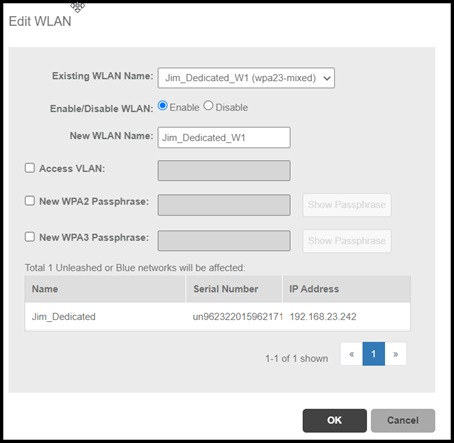
- From the list of devices, select the Unleashed network for which you want to edit the WLAN SSID, then click Edit WLAN.
- Select the ESSID from the drop-down list. The name, IP address and Serial number of the unleashed network is displayed.
- In Enable/Disable WLAN, select the desired radio button.
- In New WLAN Name, enter the name of the WLAN .
-
UMM 2.4(point 6 only)Click the Access VLAN, to edit the WLAN VLAN.
- Click the New WPA2 Passphrase, provide the password of the WLAN.
- Click OK.