Managing Software Licenses
The number of RUCKUS AP devices and ICX switches that the software can manage is limited by one or more license files. The AP devices can be ZD or Unleashed. Once the limit is reached, the additional devices will be set to 'license exceed status' and Unleashed Multi-Site Manager will stop monitoring or managing them. Refer to the page to see how many APs and switches are currently licensed.
A fresh Unleashed Multi-Site Manager installation provides only 1 Unleashed license by default. When you upgrade the software from a FlexMaster version to Unleashed Multi-Site Manager, it provides 100 ZoneDirector licenses and 1 Unleashed license, by default.
There are three types of software licenses file- one for ZD and P300, one for Unleashed, and one for ICX. ZoneDirector license consumes Unleashed Multi-Site Manager license according to its AP license. For example, ZD3500 will consume 500 licenses even when the 500 APs are not managed by Zone Director.
Unleashed license consumes software license according to its connected AP number. The unleashed license is updated whenever the software receives the information message from unleashed but the unleashed AP connect status is updated every 15 mins. So, there is a gap between the software update the Unleashed license (every 1 to 60 mins) and it’s AP connected status (15 mins). This may cause an inconsistence between connected AP and license on the web user interface.
Unleashed Multi-Site Manager will not delete the device when license expires. It just changes the status of the device which does not have enough license to License Exceeded and stops monitoring and managing them.
ICX licenses consume software license according to the number of switch units.
To enable Unleashed Multi-Site Manager to manage additional APs or switches, you need to upload at least one more license file. Use the License page in to upload a license file.
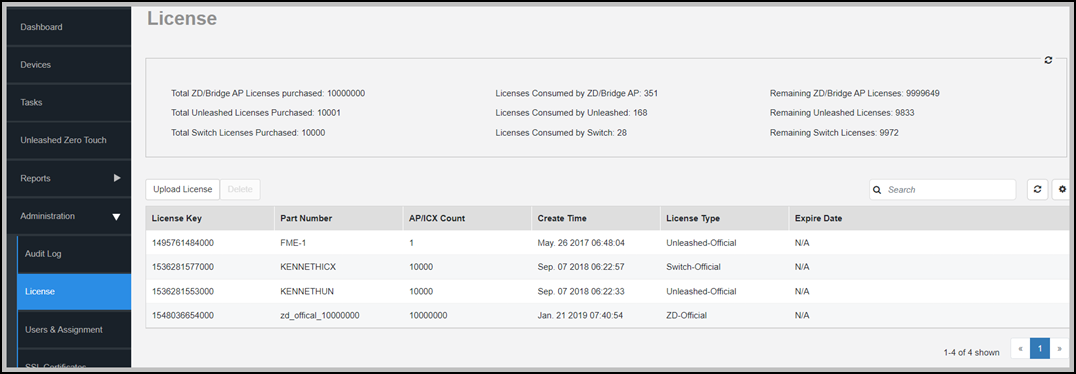
The page displays the total ZD, Unleashed and switch licenses available and the unused ZD, Unleashed and switch licenses.
When your total inventory nears the total licenses purchased, you can buy a new license to add on to the maximum number; that is, a new license adds on to the previous license, and it does not overwrite the previous license. Thus, the total licenses purchased is the sum of AP counts within each license file.