Checking Your Software License
A new Unleashed Multi-Site Manager installation provides only one Unleashed license by default. When you upgrade from a FlexMaster version to Unleashed Multi-Site Manager, it provides 100 ZoneDirector licenses and 1 Unleashed license, by default. For additional Unleashed AP management, you must buy additional licenses and upload them. Unleashed networks consume license numbers by the "active AP number" under it.
Beginning with UMM 2.3, Unleashed Multi-Site Manager supports monitoring and managing ICX switches manged by Unleashed. The number of licenses required by the switch depends on the unit number of the switch..
When you are managing ZoneDirector using Unleashed Multi-Site Manager, the number of license seats that ZoneDirector requires depends on the maximum number of APs that it can support. ZoneDirector 3250 (which supports up to 250 APs), for example, consumes 250 license seats.
When the seat limit is reached, no additional devices are able to register with Unleashed Multi-Site Manager until a license file that provides additional license seats is uploaded.
Though the Unleashed license is updated when Unleashed Multi-Site Manager receives a message from Unleashed, the Unleashed AP connection status is updated every 15 minutes. Therefore, there is a delay between when Unleashed Multi-Site Manager updates the Unleashed license (every 1~60 minutes), and its AP connection status (every 15 minutes). This delay may cause inconsistences between a connected AP and the license on the user interface.
Unleashed Multi-Site Manager does not delete a device when the license expires. The status of the device changes to License Exceeded if there are no available license seats and Unleashed Multi-Site Manager stops monitoring and managing the device.
Before using Unleashed Multi-Site Manager to manage RUCKUS devices, RUCKUS recommends that you check how many ZoneDirector devices, Unleashed APs and ICX switches can be supported by your current license. Select and review the total number of devices supported by your license and the number of seats used by ZoneDirector devices, Unleashed APs, and ICX switches.
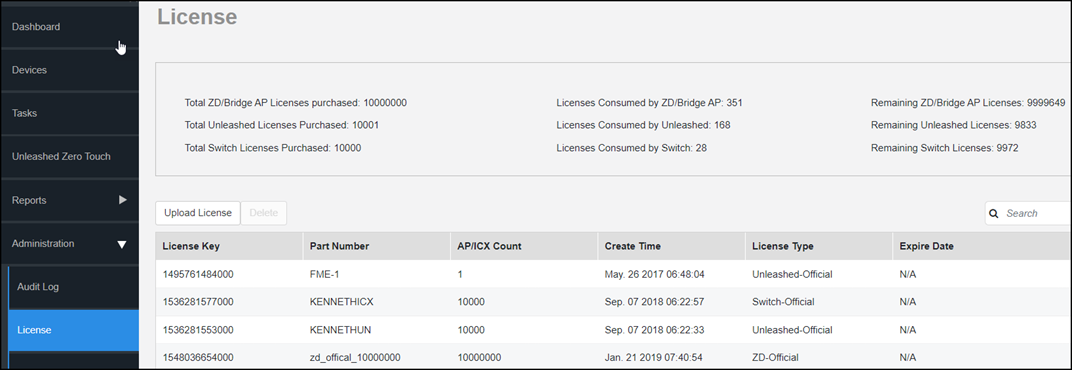
If the number of devices that you plan to manage exceeds the number of devices supported by the license file, then you need to contact your RUCKUS Sales representative, obtain a license file for additional devices, and upload it to Unleashed Multi-Site Manager.