Configuring Unleashed Multi-Site Manager Behind the NAT Server
- CentOS release 7.5 (64-bit)
- CentOS release 9 (64-bit)
- Red Hat Enterprise Linux Server release 7.5 (64-bit)
- Red Hat Enterprise Linux Server release 9 (64-bit)
Before installing this version of Unleashed Multi-Site Manager, you must upgrade OpenSSL and its library to the right Linux version as specified:
For example, you can issue this command to upgrade OpenSSL version with Linux:
yum upgrade openssl 1.1.1
- Install Unleashed Multi-Site Manager. Refer to Installing and Upgrading Unleashed Multi-Site Manager for complete instructions.
- Log in to the NAT server.
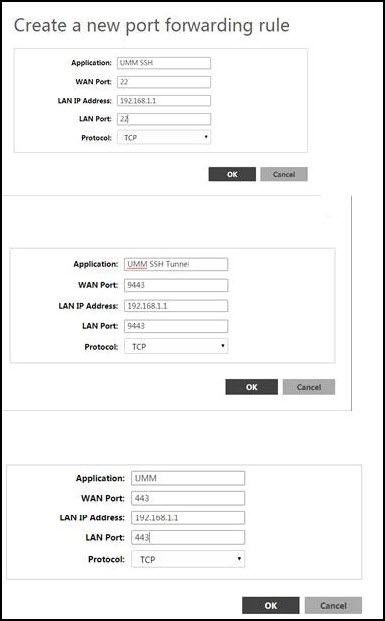
- Create port forwarding rules: TCP: UMM IP: 9443, TCP: UMM IP: 443 and TCP: UMM IP: 22