Configuring ZoneDirector & 200.5 Unleashed In Front of the NAT Server

You can configure ZoneDirector & 200.5 Unleashed in front of the NAT Server.
  1. Upload the Unleashed license as described in Uploading a License File.
    There are two types of Unleashed Multi-Site Manager licenses files: one for ZoneDirector and the other for Unleashed. Ensure you select the correct file.
  2. Enable and configure the management interface according to your network from 200.5 Unleashed web interface:
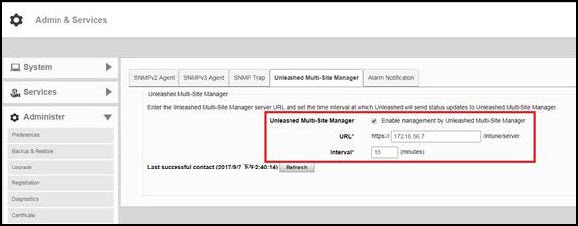
    1. Go to Admin & Services > Administer > Network Management > Unleashed Multi-Site Manager Management.
    2. Select the Enable management by Unleashed Multi-Site Manager checkbox.
      Configure the following:
      • URL: The IP address or URL of the software server.
      • Interval: the time interval (in minutes) within which the Unleashed device sends the TR069 information to Unleashed Multi-Site Manager. It is recommended that you configure this interval according to your network capacity.

    Enabling Unleashed Multi-Site Manager Management

  3. Enable and configure the management interface according to your network from ZoneDirector web interface:
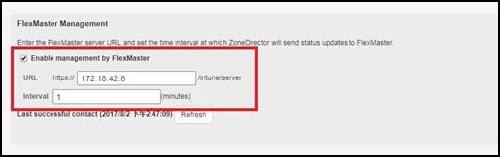
    1. Go to Configure > System > Network Management.
    2. In FlexMaster Management, select the Enable Management by FlexMaster checkbox.
      Configure the following:
      • URL: The IP address or URL of the software server.
      • Interval: the time interval (in minutes) within which the Unleashed device sends the TR069 information to Unleashed Multi-Site Manager. It is recommended that you configure this interval according to your network capacity.

    Enabling Unleashed Multi-Site Manager Management on ZD

  4. Login to the Unleashed Multi-Site Manager web interface and go to Devices. The ZD and 200.5 Unleashed devices will be listed.