Cloudpath Connectivity with External Systems
The following sections provide information about various types of external systems that may be integrated with your Cloudpath system:
Connecting to Ruckus Controllers
If you are using a Ruckus SmartZone controller to integrate with your Cloudpath system, there is a configuration field in Cloudpath that requires the hostname, not the IP address, of the controller so that Cloudpath can obtain the root certificate from the controller. For example, DPSK requires this field.
The field is called "WLAN IP/DNS," as shown in the screen below. You must enter the fully qualified domain name of the controller in this field.
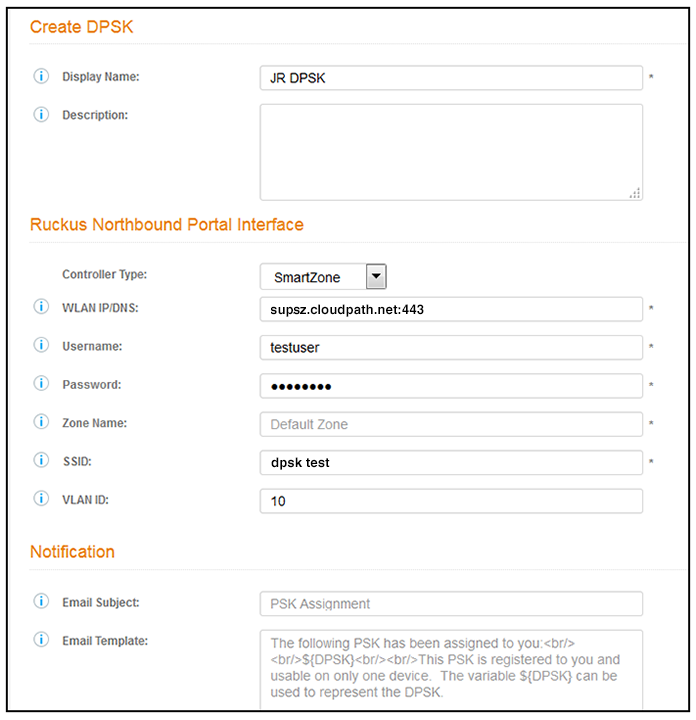
For information about where this screen fits into the Cloudpath configuration process, you can refer to Configuring Cloudpath to Work With Ruckus Dynamic Pre-Shared Key (DPSK). See the "Configuring DPSK on Cloudpath to Integrate with SmartZone" chapter.
Once you save this configuration, Cloudpath connects to the controller and pulls all the information available, including the root certificate.
Note about MAC Registration: With MAC registration, the client device communicates directly with an access point. Because the Cloudpath system is not directly involved in this communication, a certificate is not required for the Truststore.
Connecting to Firewalls
See the Cloudpath Integration with Palo Alto Firewalls manual for instructions to connect to a firewall by configuring the information in the following screen (Configuration > Firewalls & Web Filters):
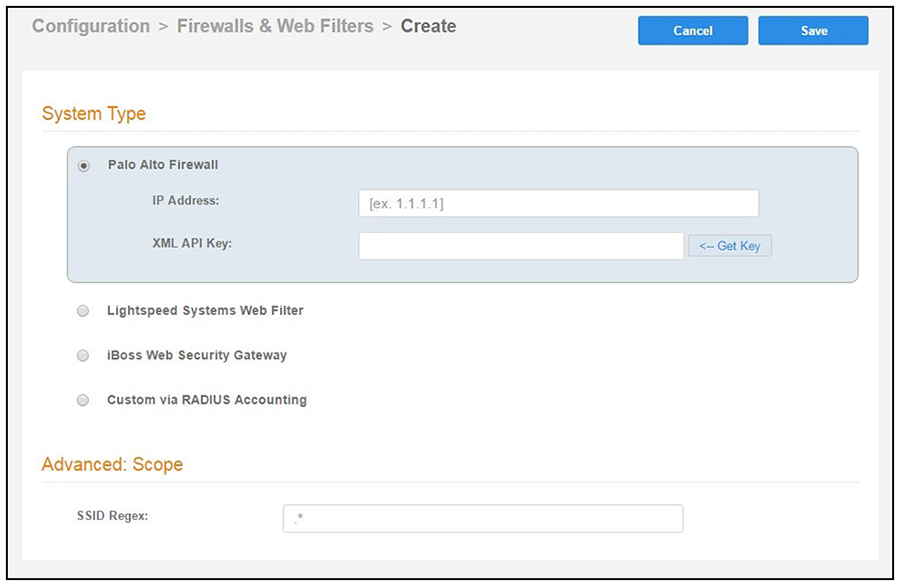
After you have completed the instructions in the Cloudpath Integration with Palo Alto Firewalls manual, Cloudpath attempts to establish an SSL connection to the firewall. When configuring the information in the screen shown above, you might receive the following error:
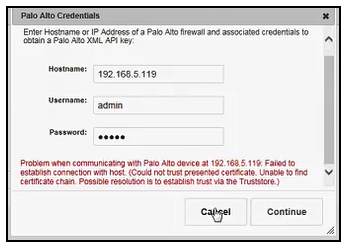
If you do receive this error, you must manually add the root certificate to Cloudpath by following the steps in Recommended Method for Adding Certificates to the Cloudpath Truststore.
Active Directory
In the initial Cloudpath system setup, if you configured an active directory, then the associated root certificate should already be in the Truststore.