Using CAPTCHA Options With Out-of-Band Workflow Plugins
new for
5.9R3
If you select the "Onboard Via Cloud" option for either the
Outbound Email or Outbound SMS system service, you must use either CAPTCHA or RECAPTCHA
with
either of the two existing out-of-band workflow plugins: "Perform out-of-band verification"
or "Request access from a sponsor offline" workflow plugins. If you select any option
other
than "Onboard Via Cloud" for both the Outbound Email and Outbound SMS system services,
you
then have the additional option of not prompting the user for CAPTCHA or RECAPTCHA
during an
enrollment. Follow the steps below to explore your options:
- In the Cloudpath UI, navigate to Administration > System Services.
- Scroll down to the Outbound Email service and click the edit icon.
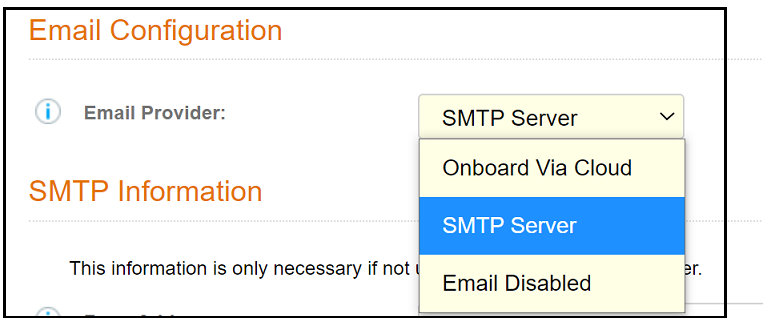
- Click on the Email Provider drop-down to invoke the email provider options:
- Make the selection of your choice:
- Onboard Via Cloud: Emails are routed through cloud servers. If you select this option, the "Perform out-of-band verification" or "Request access from a sponsor offline" workflow plugins will use CAPTCHA or RECAPTCHA (based on how you configure those plugins) during user enrollment to help protect the system against malicious automated flooding for requests for access.
- SMTP Server: Emails are routed to your own email server, based on the information you configure in the SMTP Information portion of the screen.
- Email Disabled: Outgoing emails are disabled.
- Complete the Outbound Email configuration and click Save.
- Scroll down to the Outbound SMS service and click the edit icon.
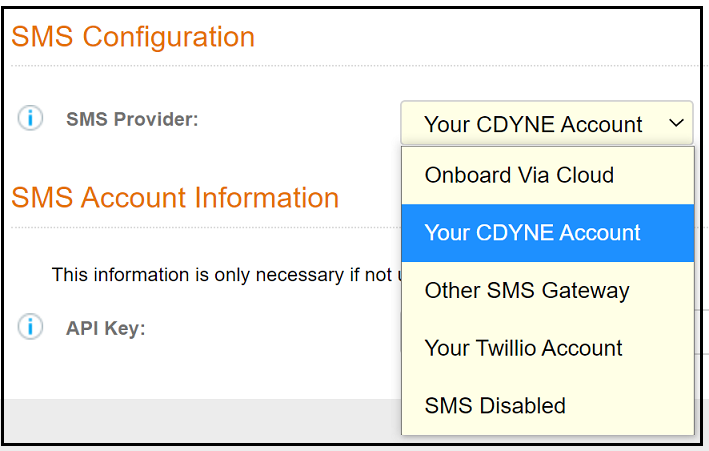
- Click on the SMS Provider drop-down to invoke the SMS Provider options:
- Make the selection of your choice:
- Onboard Via Cloud: SMS messages are routed through cloud servers. If you select this option, the "Perform out-of-band verification" or "Request access from a sponsor offline" workflow plugins will use CAPTCHA or RECAPTCHA (based on how you configure those plugins) during user enrollment to help protect the system against malicious automated flooding for requests for access.
- Your CDYNE Account: SMS messages are routed through a customer-owned CDYNE account.
- Other SMS Gateway: SMS messages are routed through a customer-owned account. The URL of the SMS gateway is required.
- Your Twillio Account: SMS messages are routed through a customer-owned Twillio account.
- SMS Disabled: No SMS messages are sent.
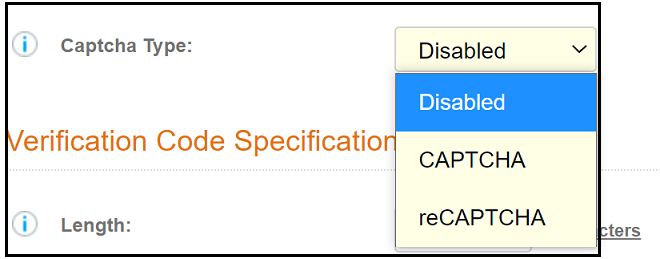
- Select the desired CAPTCHA option in
the "Perform out-of-band verification" or "Request access from a sponsor offline"
workflow plugins as you add (or edit) them as a step in a workflow. Scroll to the
Captcha Type drop down (the example screen is from the "Request access from a
sponsor offline" plugin), and make your selection:
Note: The "Disabled" option appears only if you did not use the "Onboard Via Cloud" option in either Email Provider Options or SMS Provider Options.