Monitoring LLDP Neighbors
Link Layer Discovery Protocol (LLDP) is a
Layer 2 neighbor discovery protocol that allows devices to advertise device information
to
other devices on the network. LLDP enables a station attached to an IEEE 802 LAN
or MAN to
advertise its capabilities to, and to discover, other stations in the same IEEE
802 LAN
segments. By default, the system capabilities are automatically advertised when
LLDP is
enabled on a global basis.
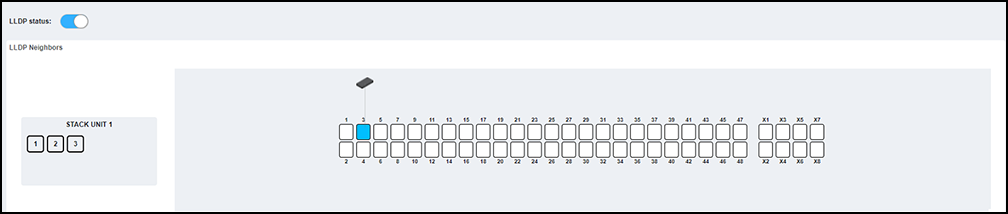
Complete the following steps to view the LLDP neighbor devices and the ports through which they are connected.
- From the main menu, select .
- Toggle the LLDP status switch to to enable or disable LLDP globally. By default, LLDP is enabled.
- If the unit is a stack, select a
unit ID box in the STACK UNIT panel to view the corresponding ports panel
of the stack unit. If the unit is standalone, then the unit's ports panel is
displayed by default.The system displays all LLDP neighbor devices in the
network along with the ports to which they are connected.new screenshotLLDP Neighbor Table Properties
Field/Column Description Local Port The port on the local device. Remote Port The port on the neighbor device. Type The type of the device. Name The name of the device. Local MAC The MAC address of the local port. Remote MAC The MAC address of the neighbor port. Remote IPv4 This field provides a hyperlink that allows access to the remote switch’s WebUI over IPv4. Remote IPv6 This field provides a hyperlink that allows access to the remote switch’s WebUI over IPv6. - Hover your cursor over a remote device in the ports panel to view the device information such as port number, name, device type, IP address, and the MAC address. Hover your cursor over a connecting port in the ports panel to view the local MAC address.