Configuring an IPv6 ACL
Complete the following steps to configure an IPv6 ACL.
- From the main menu, select
. All the configured ACLs are listed in the main pane. You can perform the following actions:
- Add an ACL: Continue to step 2 to add a new ACL.
- Edit an ACL: Click the
 icon to display the Edit Access
List dialog box. You can delete the existing rule or add new
rules. Make the necessary changes and click Apply to
apply the changes.
icon to display the Edit Access
List dialog box. You can delete the existing rule or add new
rules. Make the necessary changes and click Apply to
apply the changes. - Delete an ACL: Click the
 icon to display the Delete Access
List dialog box. Click Apply to
delete the ACL.
icon to display the Delete Access
List dialog box. Click Apply to
delete the ACL.
- Click the
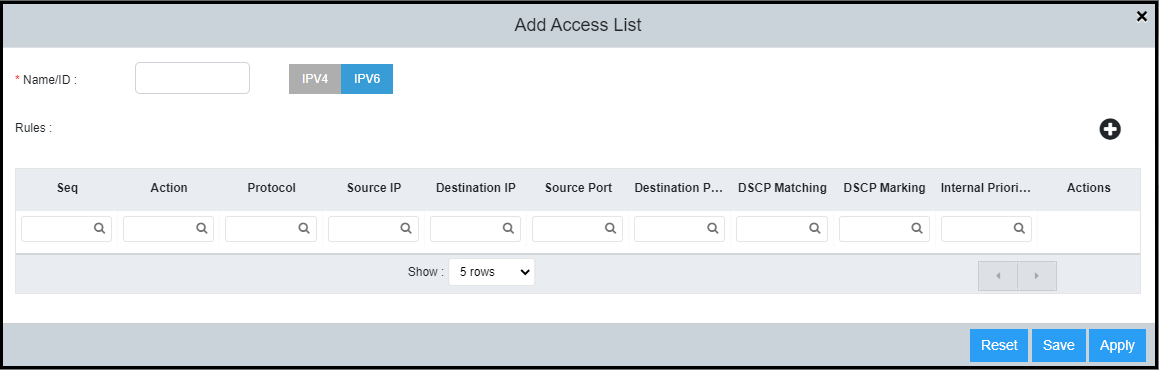
 icon to display the Add Access List dialog box.
- Click the IPv6 tab and enter a unique ACL name in the Name/ID field. The name must begin with an alphabetical character and can contain up to 47 alphanumeric characters.
- For Rules, click the
icon to add ACL rules with the following parameters:
- Seq: Assign a sequence number to the ACL rule; select a value (1–65000) using the spinner.
- Action: Select Permit or Deny from the list to filter the traffic according to the rules.
- Protocol: Select the protocol type (IPv6, TCP or UDP) to be specified as a match for filtering.
- Source IP: Enter the source IP address for which you want to filter the subnet.
- Destination IP: Enter the destination IP address for which you want to filter the subnet.
- Source Port: Specify the source port of the specified protocol (applies to TCP and UDP only).
- Destination Port: Specify the destination port of the specified protocol (applies to TCP and UDP only).
- DSCP Matching: Allows filtering by DSCP value; select a value (0–63) using the spinner.
- DSCP Marking: Assign the DSCP value for the packet; select a value (0–63) using the spinner.
- Internal Priority: Assign the internal queuing priority (traffic class) for the packet; select a value (0–7) using the spinner.
- Click Apply to create the IPv6 ACL.
=GUID-F6031631-0833-414F-9CFB-11B0DA19775C=3=en-US=Low.png)