Displaying Stack Details

A stack is a group of devices that operate as a single chassis. A RUCKUS stack contains 2 to 12 units configured in a ring or linear topology. The units in a stack are from the same model family; for example, a stack can be an ICX 8200 stack or an ICX 7850 stack, but it cannot combine ICX 8200 and ICX 7850 devices. Stack members can be physically separated or located together. For example, top-of-rack (ToR) switches can form a stack that acts as a single switch to manage data center access. Stack members can be physically separated, and the distance between stacking members depends on the type of connector cables used.
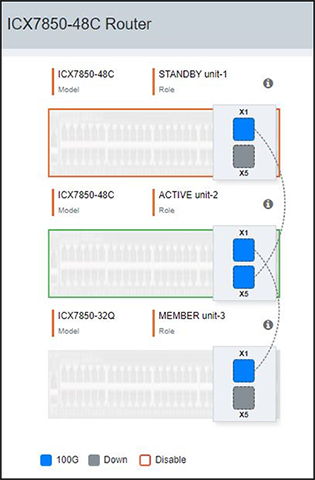
Complete the following steps to display stack details.

  1. From the main menu, select Stack.

    In the main pane, you can view the stack topology, stacking ports, and connection details, among other information. Only the connected and configured ports are displayed.

    Stack Information

    The following details are displayed:
    • Model: Displays the model of the ICX device that is part of the stack.
    • Role: Displays the role of the unit within the stack: active, standby, or member.

    The color code on each port represents different port speeds displayed beneath the graphics.

  2. Pause your cursor over the icon to display the following details:
    • Unit: Displays the unit number.
    • Mac: Displays the MAC address of the device.
    • Pri: Displays the priority assigned to the unit.
    • State: Displays the operational state of the unit: local or remote.
    • Comment: Displays additional information about the unit.