Network and management interfaces
Each device includes the following management interfaces.
The ports are located on the front panels of the devices. The following figure shows an example of a 48-port device.
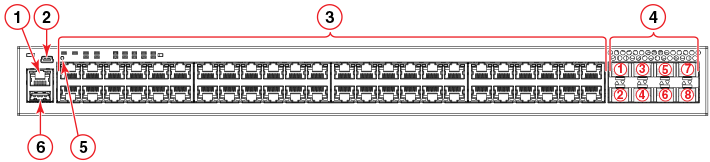
- Out-of-band management port (RJ-45)
- Console port (mini-USB)
- Slot 1 (10/100/1000 Mbps ports - RJ-45)
- Slot 2 (SFP+ uplink or stacking ports)
- Reset button - not a management interface, shown for
reference only.
You can press the reset button to reboot the switch and reload the software without turning off the power supply.
Note: The reset button on the ICX 7250 cannot be used for a factory reset. If you want to perform a factory reset, you must use the CLI, as described in Performing the Factory Reset from the CLI. - USB port