Viewing and Syncing Config Template Drifts
RUCKUS One detects configuration
drift between an MSP configuration template and the configurations applied to End
Customers
(ECs). A drift occurs when an EC’s configuration differs from the configuration defined
in
the MSP template. You can review these differences and synchronize the EC configuration
to
match the MSP template.
 icon
displays the message indicating that the Drifts are not available.
icon
displays the message indicating that the Drifts are not available.- In the navigation bar, select
.The Configuration Templates page is displayed.
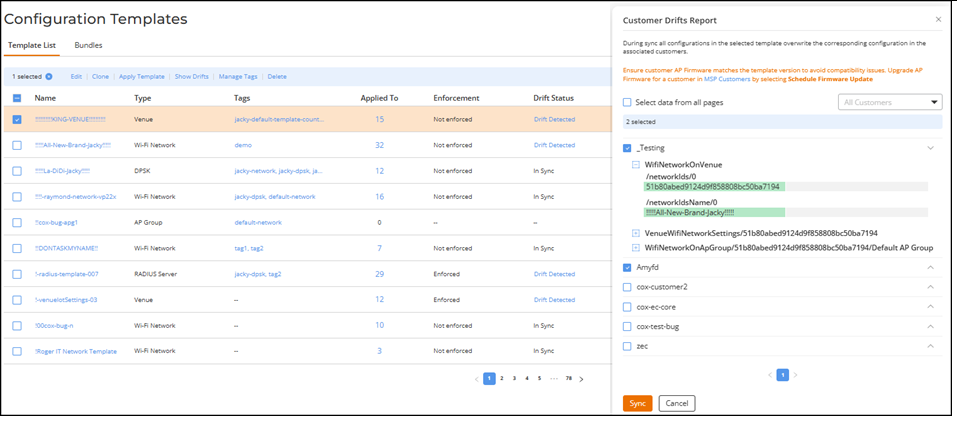
- Select the configuration template with the Drift Detected status by clicking the radio button next to the Name field.
- Click Show Drifts.
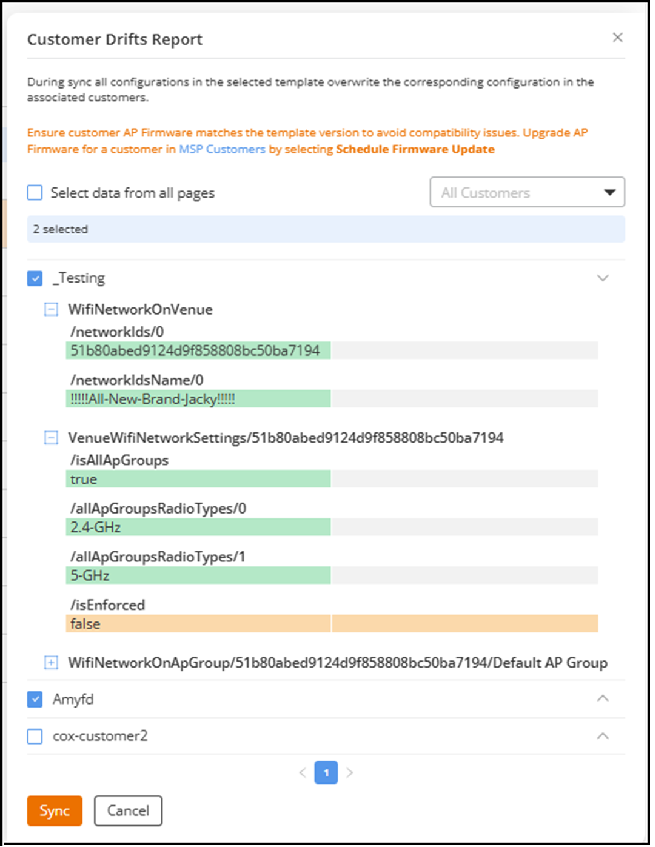
- Review the configuration differences displayed in the report.
- Synchronize configuration drifts to ensure consistency between the MSP
configuration template and EC configurations.
- Note:
- The Sync operation synchronizes only the template-related configurations to the MSP-EC tenant.
- The Sync operation attempts to apply the dependent templates if the MSP-EC tenant does not already have them.
- Synchronizing drifts
overwrites existing configurations in the associated venues or
devices. Review the configuration differences carefully in the Drifts Report
before applying changes. If the venue template includes AP Management
VLAN settings, the VLAN configuration will also be updated
when you sync the drift.
ACX-101603 - Config Template 5 - Append Mgmt VLAN in Venue template Zam Huang (SME)
- The system updates the applied configuration using the current version of the template.