Editing an End Customer
You can edit certain details of an end
customer's information and configuration.
- On the navigation bar, select
.The MSP Customers page is displayed.
- Select the checkbox next to the customer, and then click Edit.
- In the Account Details section, you can modify the following information:
- Review the
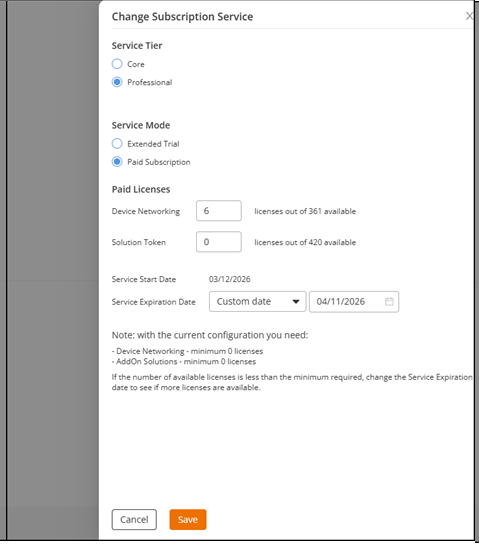
Subscription Service information.In Subscription Service, click Change. The Change Subscription Service sidebar is displayed.ACX-107090. Service Tier and other config options are moved to Subscription Service. Have to remove Service Tier from step 3 and step 5 before publishing to avoid duplicate info.Modify the following:
- Service
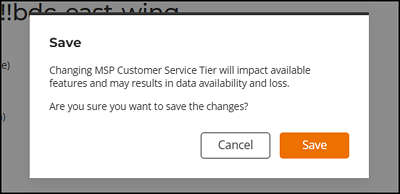
Tier: When you change the service tier, you must confirm
the update before saving.
Note: Changing the service tier affects the features available for that tier. Downgrading from Professional to lower tier results in data loss.Note: Changes to the Service Tier are logged on the Activities page. The activity status uses the following color codes:Note: You can click the drop-down menu to view the list of activities by status. Changes in the Service Tier setting are also captured in the customer's RUCKUS One account, by navigating to .Note: When you change the service tier in Edit Mode, regardless of any changes to the number of assigned licenses or the service expiration date, the system automatically expires the current MSP EC service and creates a new one to ensure a clear historical record of each MSP EC tier, including its corresponding Start and End Dates.ACX-89602
- Service
Mode.
- The Extended
Trial Mode section displays Device
Networking, Service Start
Date and Service
Expiration Date. Based on the current
configuration, the minimum licenses required are computed and
displayed.
Note: To ensure accuracy, the system validates the service details by checking that the Service Expiration Date is valid and that a Device Networking license is available. If both checks succeed, the service is accepted; if either check fails, a message is displayed instructing you to recheck the service details.
- In the Paid Subscriptions section, you can modify the following information:The Service Start Date is displayed as read‑only. You can choose a custom expiration date using the date selector.
- The Extended
Trial Mode section displays Device
Networking, Service Start
Date and Service
Expiration Date. Based on the current
configuration, the minimum licenses required are computed and
displayed.
- Service
Tier: When you change the service tier, you must confirm
the update before saving.
- Toggle the Enable
application-recognition and control switch on to configure the
default ARC behavior for newly added MSP customers. This setting determines
whether application recognition and control (ARC) is enabled or disabled by
default for new WLAN networks.
ACX-74153Note: Only Prime Admins and Administrators can override this setting. The overridden settings will apply only to the newly created WLANs and the existing WLAN ARC settings will be unchanged.
- Toggle the Enable access to RUCKUS Support switch on to grant temporary administrator-level access to the Ruckus Support team. This access is automatically revoked after 21 days and should be enabled only when requested by Ruckus Support.
- Click Save.