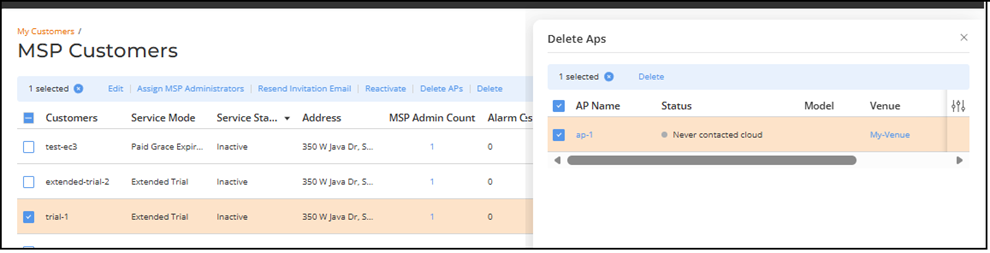
Deleting APs for an Inactive MSP Customer
- On the navigation bar, select
.The MSP Customers page is displayed.
- Select the checkbox next to a customer whose Service Status is Inactive and click Delete APs.
- Select one or more APs by
clicking the checkbox(es) next to the AP Name
column.
You can use the Search option to display only the table entries matching the specified AP Name, Model, IP Address, MAC Address, Tags, Serial Number, and External IP Address; enter a minimum of two characters.
Additionally, you can filter the AP list using the Status, Venue, AP Group, and Group By drop-down menus: The Status options are Requires Attention, Transient Issue, In Setup Phase, Offline, and Operational. The Venue and AP Group options list the available venues and AP groups configured in your account.
The Group By options are Status, Model, and AP Group. When you group the AP List by Status, Model, or AP Group, the AP List organizes the devices into summarized clusters, allowing you to quickly see how many APs belong to each group and view their associated incidents, connected clients, and network activity at a glance.
Use the Clear Filters option to remove all applied filters.
You can customize which table columns appear in the AP List table by clicking the
 icon and selecting or deselecting the desired
column names. Optionally, you can click Reset to
default to have the default subset of columns appear in the
AP List table.
icon and selecting or deselecting the desired
column names. Optionally, you can click Reset to
default to have the default subset of columns appear in the
AP List table. - Click Delete.
- Click Confirm to delete the selected APs.The APs are removed from the customer’s device list.To check - If the download icon is available, add the following instruction: - Click the
 icon on the upper-right hand corner to export
and download the AP device inventory list in .CSV format. The CSV template
includes the following fields: AP Name, Status, Model,
IP Address, MAC Address, Venue, Switch, Mesh Role, Clients, AP Group, RF
Channel, TX Power, UP Time, Serial Number, Version, PoE Port, Management
VLAN, AFC Status, AFC Power State, AFC Max Power, Secure Boot, Tags, and
External IP Address
icon on the upper-right hand corner to export
and download the AP device inventory list in .CSV format. The CSV template
includes the following fields: AP Name, Status, Model,
IP Address, MAC Address, Venue, Switch, Mesh Role, Clients, AP Group, RF
Channel, TX Power, UP Time, Serial Number, Version, PoE Port, Management
VLAN, AFC Status, AFC Power State, AFC Max Power, Secure Boot, Tags, and
External IP Address