Single IoT Access Point Mode

You can use Single IoT Access Point Mode to edit a single IoT AP.
Complete the following steps to edit a single IoT AP.
  1. From the main menu, click IoT APs.
    A list of selected IoT APs is displayed.
  2. Click an IoT AP to edit.

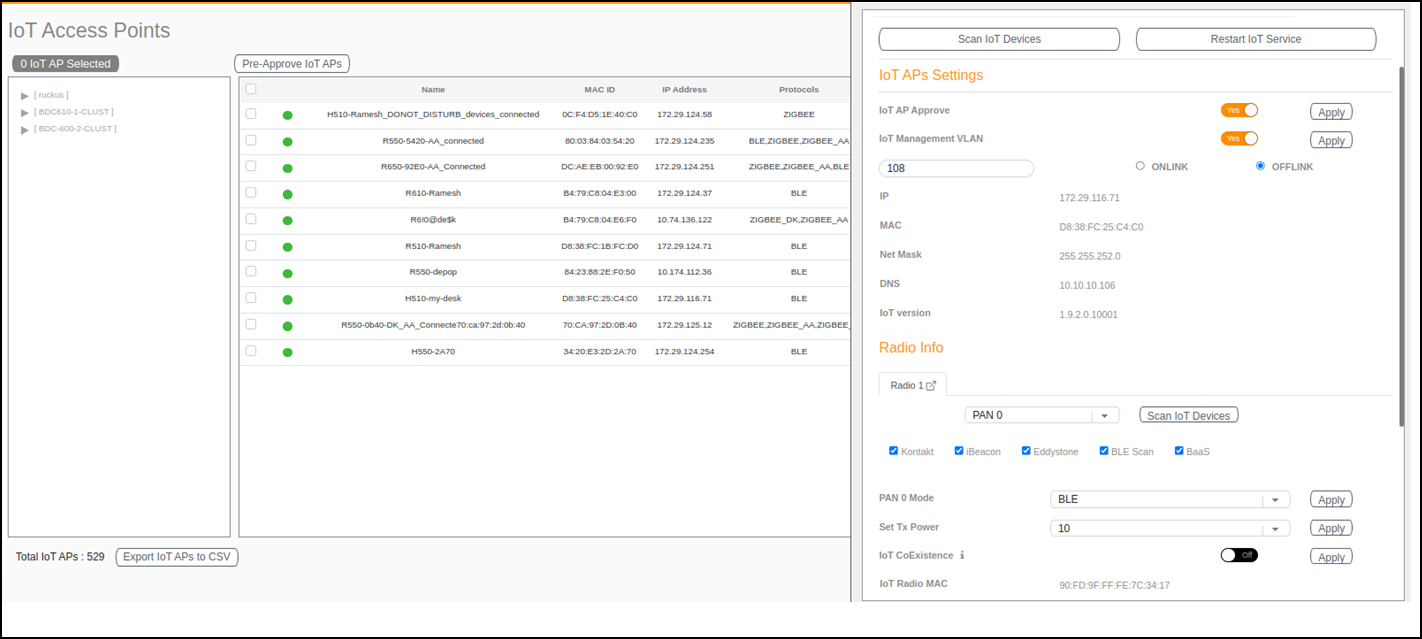
    Single IoT AP Mode

    IoT Access Point Page
    Existing information displays, and the following options can be edited:
    • Add New Tag
    • Scan for IoT Devices
    • Restart IoT Service
    • IoT AP Approve
    • Mode (Zigbee, BLE, Zigbee Assa Abloy, Zigbee DK)
    • IoT Coexistence
    • Set Channel
    • Set TxPower
    • IoT Management VLAN
    • AP Firmware
    • AP Model

    In addition, the status of the IoT AP module is available, such as network information, IoT AP module information, and properties.

  3. Click IoT Management VLAN to configure the VLAN mode.
  4. Select ONLINK to configure the VLAN within the same network.
  5. Select OFFLINK to configure the VLAN within different network or different region.