Gateway Onboarding

Gateway Onbarding can done by performing following steps.
  1. Log into AP console and set IoT Controller using the command set iotg-mqtt-brokerip <iot controller ip address>
  2. Approve the AP
  3. Configure ZigBee(DK) mode by performing below substeps.
    1. Click AP, w window will open.
    2. Select the radio that need to configure mode.
    3. For mode, from drop down list, select “ZigBee(DK).
    4. Click Apply
      The ZigBee_DK protocol has been configured successfully.
  4. After Configuring ZigBee_DK successfully, login to Ambiance Server and go to “Device Management”, and click Registered Gateways and Paired Access Points.
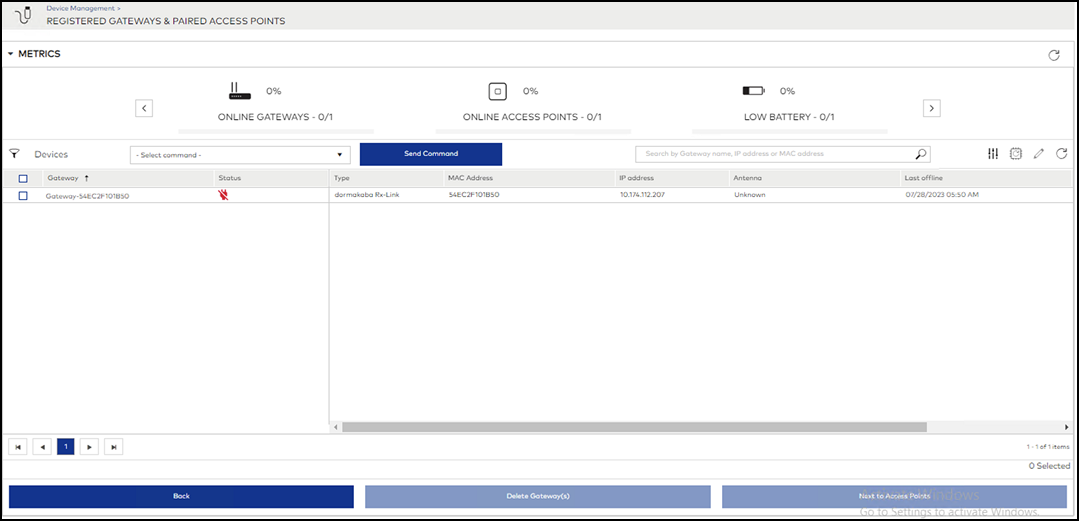
    Showing Registered Gateways and Paired Access Points

    Showing Registered Gateways and Paired Access Points