Managing AAA Settings
The AAA settings allow you to configure
the method list and the sequence in which they are performed for AAA operations
when a user
tries to gain access to the device using Telnet or SSH. You can configure primary
method
lists and backup methods for each AAA service. You can use authentication alone
or with
authorization and accounting. Authorization always requires a user to be authenticated
first. You can use accounting alone, or with authentication and authorization.
Complete the following steps to configure AAA settings.
- Select .
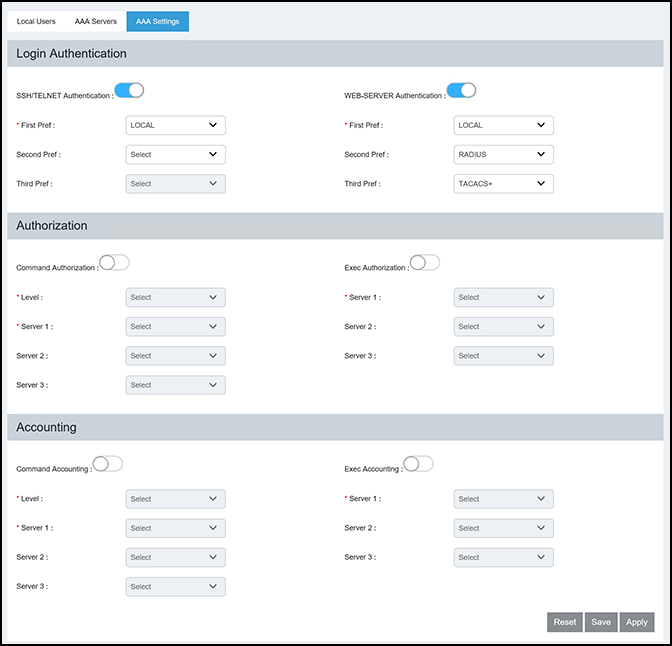
- Select the AAA Settings tab to configure server priority and privilege levels for authentication, authorization, and accounting.
- Under Login
Authentication, complete the following fields:
- SSH/Telnet
Authentication: Enabled by default. The Telnet or SSH
access request is authenticated based on the configured authentication
method. You can set the authentication methods in a sequential order
based on your preference. If authentication service is not available
from the first method, the second method is used, and so on. The
available options are RADIUS, TACACS+, and Local Users.
Note: Login authentication cannot be disabled from the web interface.
- First Pref: Select the primary authentication method from the list.
- Second Pref: Select a backup authentication method as the second choice of preference to perform authentication when the primary authentication fails.
- Third Pref: Select a backup authentication method as the third choice of preference to perform authentication when the first two authentication methods fail.
- WEB-SERVER
Authentication: You can gain access to the network by
opening a web browser and entering a valid URL address using HTTP or
HTTPS services. The web access request is authenticated based on the
configured authentication method. You can set the authentication methods
in a sequential order based on your preference. If authentication
service is not available from the first method, the second method is
used, and so on. The available options are RADIUS, TACACS+, and Local
Users.
Note: Login authentication cannot be disabled from the web interface.
- First Pref: Select the primary authentication method from the list.
- Second Pref: Select a backup authentication method as the second choice of preference to perform authentication when the primary authentication fails.
- Third Pref: Select a backup authentication method as the third choice of preference to perform authentication when the first two authentication methods fail.
- SSH/Telnet
Authentication: Enabled by default. The Telnet or SSH
access request is authenticated based on the configured authentication
method. You can set the authentication methods in a sequential order
based on your preference. If authentication service is not available
from the first method, the second method is used, and so on. The
available options are RADIUS, TACACS+, and Local Users.
- Under
Authorization, complete the following fields:
- Command
Authorization: If enabled, command authorization allows
you to determine the management privilege level and the associated set
of commands an authenticated user is authorized to use. You can set
three method lists for authorization and the available options are
RADIUS, TACACS+, and None (which disables the authorization service,
allowing all command access attempts to succeed).
- Level: Select the privilege level (Port Config, Read Only, or Read Write) from the list.
- Server 1: Select the primary method by which authorization should occur.
- Server 2: Select the backup method by which authorization should occur.
- Server 3: Select a backup method list as the third choice of preference to perform authorization.
- Exec Authorization: If enabled, EXEC authorization allows you to control user privilege levels for authenticated users. You can set three method lists for authorization and the available options are RADIUS, TACACS+, and None (which disables the authorization service, allowing all command access attempts to succeed).
- Command
Authorization: If enabled, command authorization allows
you to determine the management privilege level and the associated set
of commands an authenticated user is authorized to use. You can set
three method lists for authorization and the available options are
RADIUS, TACACS+, and None (which disables the authorization service,
allowing all command access attempts to succeed).
- Under
Accounting, complete the following fields:
- Command
Accounting: If enabled, command accounting allows you to
configure the device to perform AAA accounting for the commands
available at the specified privilege level. You can set three method
lists for accounting and the available options are RADIUS, TACACS+, and
None (which disables the accounting service).
- Level: Select the privilege level (Port Config, Read Only, or Read Write) from the list.
- Server 1: Select the primary method by which accounting should occur.
- Server 2: Select the backup method by which accounting should occur.
- Server 3: Select a backup method list as the third choice of preference to perform accounting.
- Command
Accounting: If enabled, command accounting allows you to
configure the device to perform AAA accounting for the commands
available at the specified privilege level. You can set three method
lists for accounting and the available options are RADIUS, TACACS+, and
None (which disables the accounting service).
- Select Apply to save the AAA settings.