Configuring a RADIUS Server
Complete the following steps to configure a RADIUS server.
- Select .
- Select the AAA
Servers tab. All the configured servers are listed in the main pane. You can perform the following actions:
- Add a server: Continue to step 3 to add a new server.
- Edit a server: Select
 to display the Edit Switch AAA Server dialog box.
Make the necessary changes and select Apply to
apply the changes.
to display the Edit Switch AAA Server dialog box.
Make the necessary changes and select Apply to
apply the changes. - Delete a server: Select
 to display the Delete Switch AAA Server dialog box.
Select Apply to delete the server.
to display the Delete Switch AAA Server dialog box.
Select Apply to delete the server.
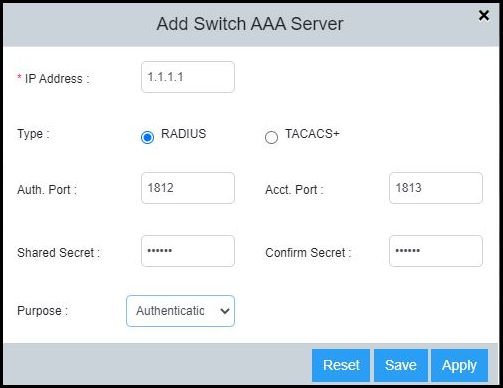
- In the AAA
Servers tab, select
 to
display the Add Switch AAA Server dialog box.
to
display the Add Switch AAA Server dialog box.
- Select Radius as the AAA server type.
- Complete the following fields:
- IP Address: Assign an IP address to the RADIUS server. The IP address can be in the IPv4 format or IPv6 format.
- Auth. Port: Enter the RADIUS authentication port number. The default value is 1812.
- Acct. Port: Enter the RADIUS accounting port number. The default value is 1813.
- Shared Secret: Specify the shared secret text string (RADIUS key) used between the device and the RADIUS server to authenticate user access.
- Confirm Secret: Re-enter the shared secret.
- Purpose: Designate the RADIUS server to handle a specific AAA operation selected from the list:
- Select Apply to add the RADIUS server.