Configuring Port Settings
The settings for a specific port, or
all configured ports, can be modified, including the port name, status, and speed.
Various
security settings can be enabled or disabled.
Complete the following steps to update the settings for a configured port, and to make bulk updates to some of the settings for all configured ports.
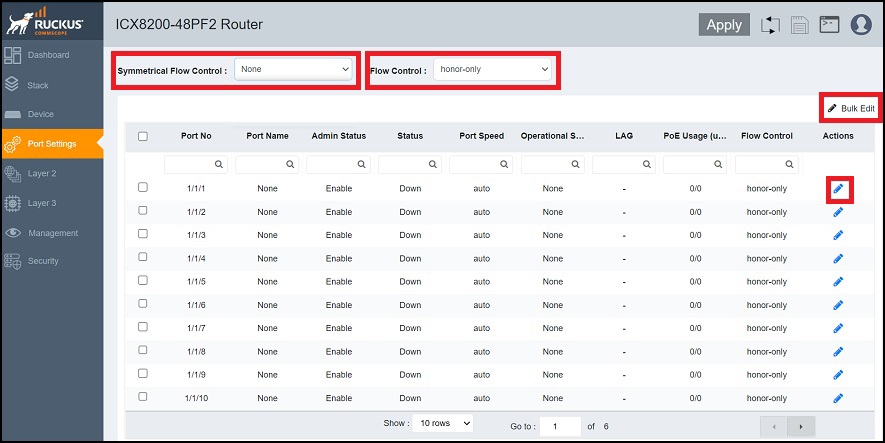
- Select Port Settings. The configured ports are listed in the main pane. You can perform the following actions:
- Configure symmetric flow control (globally): For more information, refer to Configuring Symmetric Flow Control.
- Configure flow control (globally): For more information, refer to Configuring Flow Control.
- Edit port settings: To edit port settings, continue to Step 2.
- Bulk edit port settings: To edit port settings for several or all ports, continue to Step 6.
- Select the
 icon in the row of a port to display the Port Setting
dialog box.
icon in the row of a port to display the Port Setting
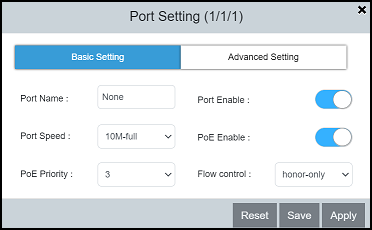
dialog box. - On the Basic Setting
tab, complete the following fields, as required:
- Port Name: Enter the updated port name.
- Port Enable: Enable or disable the port.
- Port Speed: Select the port speed.
- PoE Enable (Available only for PoE-capable ports): Enable or disable the port for PoE.
- PoE Priority (Available only for PoE-capable ports): Select the priority.
- Flow control: Select
the following options from the list to configure flow control:
- both: Configures flow control in PAUSE generation and honoring mode.
- generate-only: Configures flow control in PAUSE generation mode only.
- honor-only: Configures flow control in PAUSE honoring mode only.
- neg-on: Enables flow control negotiation. If selected, flow control is enabled or disabled depending on the peer advertisement. When flow control is enabled globally and auto-negotiation is on, flow control is advertised on 10/100/1000M ports. If auto-negotiation is off or if the port speed was configured manually, flow control is not negotiated with or advertised to the peer.
- None: Disables flow control configurations.
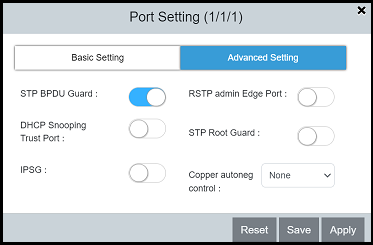
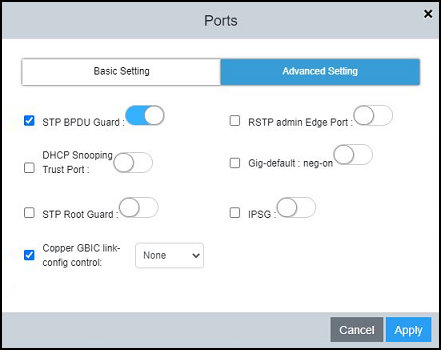
- On the Advanced Setting tab, complete the following
fields, as required:
- STP BPDU Guard: Enable or disable the STP BPDU Guard on the port.
- DHCP Snooping Trust Port: Enable or disable trust for the port.
- IPSG: Enable or disable IP Source Guard (IPSG) protection for the port.
- RSTP admin Edge Port: Enable or disable the port as an edge port with Rapid Spanning Tree Protocol (RSTP).
- STP Root Guard: Enable or disable STP root guard.
- Copper autoneg control: Select the maximum advertised speed for the port.
- Select to apply the changes.
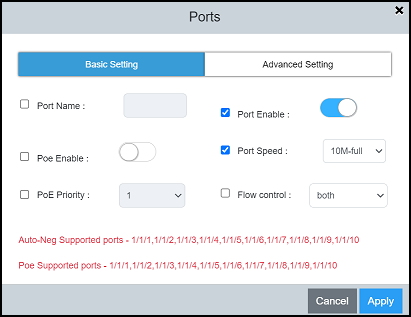
- To update the settings for
several or all configured ports at once, select the ports that you want to
update and select Bulk
Edit. The Ports dialog box displays.
- In the Basic Setting tab and the Advanced Setting tab, select the check box of each setting you want to enable and make the any other required changes.
- Select to apply the changes to the selected ports.