Configuring a Standard IPv4 ACL
Complete the following steps to configure a standard IPv4 ACL.
- Select . All the configured ACLs are listed in the main pane. You can perform the following actions:
- Add an ACL: Continue to step 2 to add a new ACL.
- Edit an ACL: Select
 to display the Edit Access
List dialog box. You can delete the existing rule or add new
rules. Make the necessary changes and select Apply to
apply the changes.
to display the Edit Access
List dialog box. You can delete the existing rule or add new
rules. Make the necessary changes and select Apply to
apply the changes. - Delete an ACL: Select
 to display the Delete Access
List dialog box. Select Apply to
delete the ACL.
to display the Delete Access
List dialog box. Select Apply to
delete the ACL.
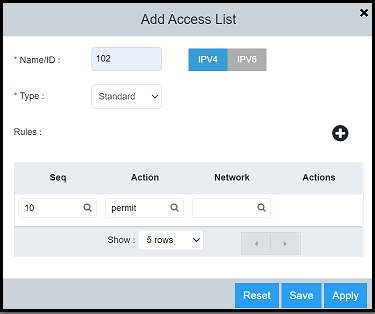
- Select
 to
display the Add Access List dialog box.
to
display the Add Access List dialog box.
- Select the IPv4 tab and complete the following fields:
- For Rules, select to
add ACL rules with the following parameters: Note: All the parameters are mandatory.
- Select Apply to create the standard IPv4 ACL.
=GUID-B71E6BE4-7DEF-4D6F-BAC6-2132D672D5D8=3=en-US=Low.png)