Port-Side View of the RUCKUS ICX 7550 Switch
Port-Side View of ICX 7550-24

- Mode status LEDs: STAT, SPD, ID, USB
- System LEDs
- Type-C USB console port
- 40 Gbps stacking port 2/1
- 40 Gbps link/activity LEDs (blue) for stacking port 2/1
- Expansion module ports (optional)
- 40 Gbps link/activity LEDs for stacking port 2/2
- 40 Gbps stacking port 2/2
- 24x10/100/1000 Mbps RJ-45 ports
- Reset button
- RJ-45 port status LEDs (odd numbers are for upper ports; even numbers are for lower ports)
Port-Side View of ICX 7550-48

- Mode status LEDs: STAT, SPD, ID, USB
- System LEDs
- Type-C USB console port
- 40 Gbps stacking port 2/1
- 40 Gbps link/activity LEDs (blue) for stacking port 2/1
- Expansion module ports (optional)
- 40 Gbps link/activity LEDs for stacking port 2/2
- 40 Gbps stacking port 2/2
- 48x10/100/1000 Mbps RJ-45 ports
- Reset button
- RJ-45 port status LEDs (odd numbers are for upper ports; even numbers are for lower ports)
Port-Side View of ICX 7550-24P

- Mode status LEDs: STAT, SPD, ID, USB, PoE
Other than ports 1-24 supporting PoE, everything else is identical to the plain 7550-24 model.
- System LEDs
- Type-C USB console port
- 40 Gbps stacking port 2/1
- 40 Gbps link/activity LEDs (blue) for stacking port 2/1
- Expansion module ports (optional)
- 40 Gbps link/activity LEDs for stacking port 2/2
- 40 Gbps stacking port 2/2
- 24x10/100/1000 Mbps RJ-45 ports
- Reset button
- RJ-45 port status LEDs (odd numbers are for upper ports; even numbers are for lower ports)
Note: Ports 1 through 24 support PoE.
Port-Side View of ICX 7550-48P

- Mode status LEDs: STAT, SPD, ID, USB, PoE
- System LEDs
- Type-C USB console port
- 40 Gbps stacking port 2/1
- 40 Gbps link/activity LEDs (blue) for stacking port 2/1
- Expansion module ports (optional)
- 40 Gbps link/activity LEDs for stacking port 2/2
- 40 Gbps stacking port 2/2
- 48x10/100/1000 Mbps RJ-45 ports
- Reset button
- RJ-45 port status LEDs (odd numbers are for upper ports; even numbers are for lower ports)
Note: Ports 1 through 48 support PoE.
Port-Side View of ICX 7550-24ZP

- Mode status LEDs: STAT, SPD, ID, USB, PoE
- System LEDs
- Type-C USB console port
- 40/100 GbE uplink/stacking port 2/1
- 40/100 Gbps link/activity LEDs for stacking port 2/1
- 40/100 Gbps stacking port 2/2 LEDs (blue)
- Expansion module ports (optional)
- 40/100 GbE uplink/stacking port 2/2
- 12x1/2.5/5/10 GbE RJ-45 ports
- 12x1/2.5 GbE RJ-45 ports
- Reset button
- RJ-45 port status LEDs (odd numbers are for upper ports; even numbers are for lower ports)
Port-Side View of ICX 7550-48ZP

- Mode status LEDs: STAT, SPD, ID, USB, PoE
- System LEDs
- Type-C USB console port
- 40/100 GbE uplink/stacking port 2/1
- 40/100 Gbps link/activity LEDs for stacking port 2/1
- 40/100 Gbps stacking port 2/2 LEDs (blue)
- Expansion module ports (optional)
- 40/100 GbE uplink/stacking port 2/2
- 12x1/2.5/5/10 GbE RJ-45 ports
- 36x1/2.5G GbE RJ-45 ports
- Reset button
- RJ-45 port status LEDs (odd numbers are for upper ports; even numbers are for lower ports)
Port-Side View of ICX 7550-24F

- Mode status LEDs: STAT, SPD, ID, USB
- System LEDs
- Type-C USB console port
- 40/100 GbE uplink/stacking port 2/1
- 40/100 Gbps link/activity LEDs for stacking port 2/1
- 40/100 Gbps stacking port 2/2 LEDs (blue)
- Expansion module ports (optional)
- 40/100 GbE uplink/stacking port 2/2
- 24x10 GbE SFP ports
- SFP port status LEDs (upper-pointing triangles are for upper ports; lower-pointing triangles are for lower ports)
- Reset button
Port-Side View of ICX 7550-48F

- Mode status LEDs: STAT, SPD, ID, USB
- System LEDs
- Type-C USB console port
- 40/100 GbE Uplink/Stacking port 2/1
- 40/100 Gbps link/activity LEDs for stacking port 2/1
- 40/100 Gbps stacking port 2/2 LEDs (blue)
- Expansion module ports (optional)
- 40/100 GbE uplink/stacking port 2/2
- 12x10 GbE SFP ports
- 36x1 GbE SFP ports
- SFP port status LEDs (upper-pointing triangles are for upper ports; lower-pointing triangles are for lower ports)
- Reset button
Port-Side View of ICX 7550-24XZP
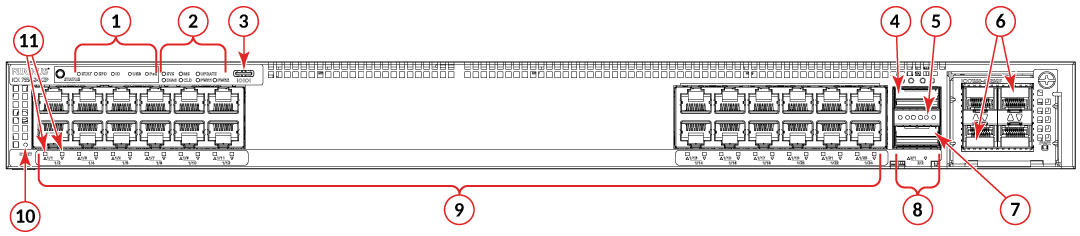
- Mode status LEDs: STAT, SPD, ID, USB
- System LEDs
- Type-C USB console port
- 40/100 GbE uplink/stacking port 2/1
- 40 Gbps link/activity LEDs for stacking port 2/1
- Expansion module ports (optional)
- 40/100 GbE uplink/stacking port 2/2
- 40 Gbps link/activity LEDs for stacking port 2/2
- 24X10G GbE copper ports
- Reset Button
- RJ-45 port status LEDs (odd numbers are for upper ports; even numbers are for lower ports)
Note: Ports 1 through 24 support PoE.