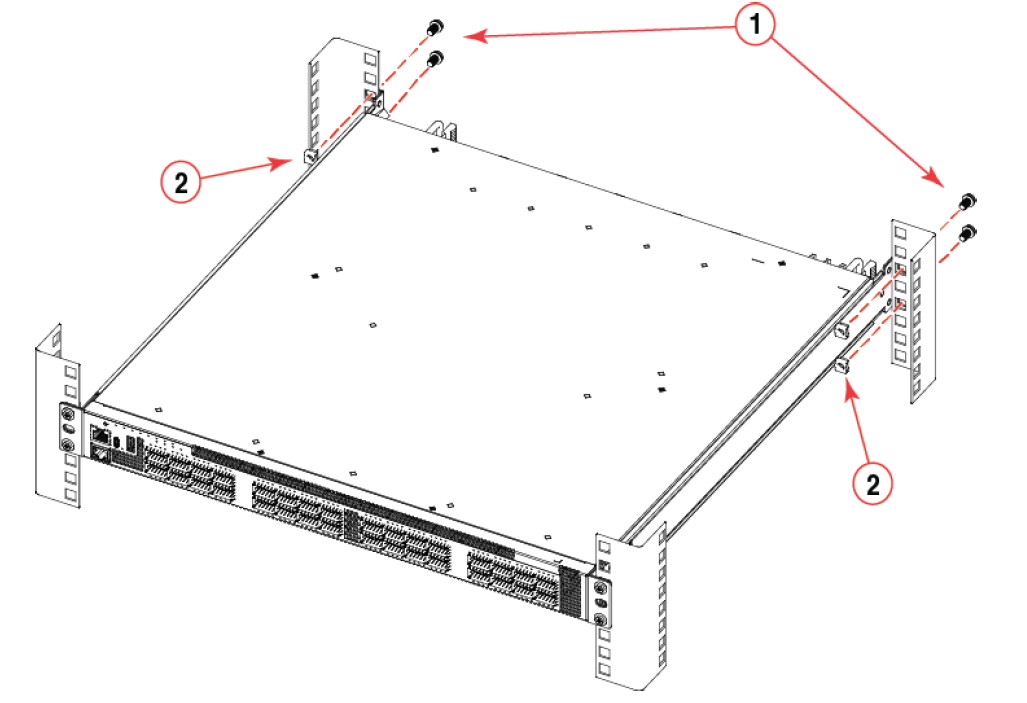
Attaching the Rear Brackets to the Rack Posts
Complete the following steps to attach the rear brackets to the rack posts.
- Slide the right rear bracket into the right front bracket and the left rear bracket into the left front bracket.
- Adjust the rear brackets to the rack depth.
-
Attach the right rear bracket to the right rear rack post using two 10-32 x 5/8-inch panhead screws and two retainer nuts, as shown in Attaching the Rear Brackets to the Rack Posts. Use the upper and lower holes in the bracket.
-
Attach the left rear bracket to the left rear rack post using two 10-32 x 5/8-inch panhead screws and two retainer nuts. Use the upper and lower holes in the bracket.
- Tighten all the 10-32 x 5/8-inch screws to a torque of 25 in-lb (29 cm-kg).