Grounding the RUCKUS ICX 7550 Switch
The rear panel of the RUCKUS ICX 7550 includes a grounding terminal. The surface area around this terminal is not painted to provide a good electrical connection. Before connecting power to the device, the grounding terminal must be connected to ground to ensure proper operation and to meet electromagnetic interference (EMI) and safety requirements.
Default and Optional Lugs
The default lug for the grounding terminal is the one-hole lug, but there is also an option for a two-hole lug. Both are shown below.
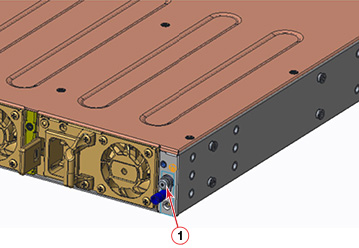
One-lug information:
- Manufacturer of grounding lug: Jeesoon Terminals
- Part Number: 90R2-4LA
- Screw: Machine Screw, M4-0.7x8
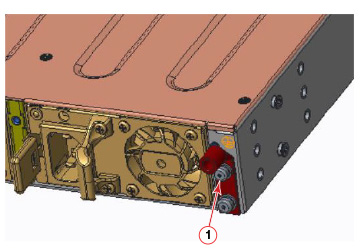
Two-lug information:
Connecting to the Grounding Terminal
Regardless of which lug you are using, perform the following steps to connect to the grounding terminal.
- Ensure that the rack in which the RUCKUS ICX 7550 is mounted is properly grounded and in compliance with local regulations.
- Ensure that there is a good electrical connection to the grounding point on the rack (no paint or isolating surface treatment).
- Crimp the included grounding lug to a grounding wire of at least 12 American Wire Gauge (AWG). The 12 AWG wire and grounding lug should be crimped together using a proper tool.
- Attach the 12 AWG stranded copper wire to the grounding terminal on the RUCKUS ICX 7550 using the screw(s) included in the grounding kit.
- Attach the grounding wire to the grounding point on the rack.
Note: The terminal for the connection of a grounding conductor is not to be used with an aluminum conductor.