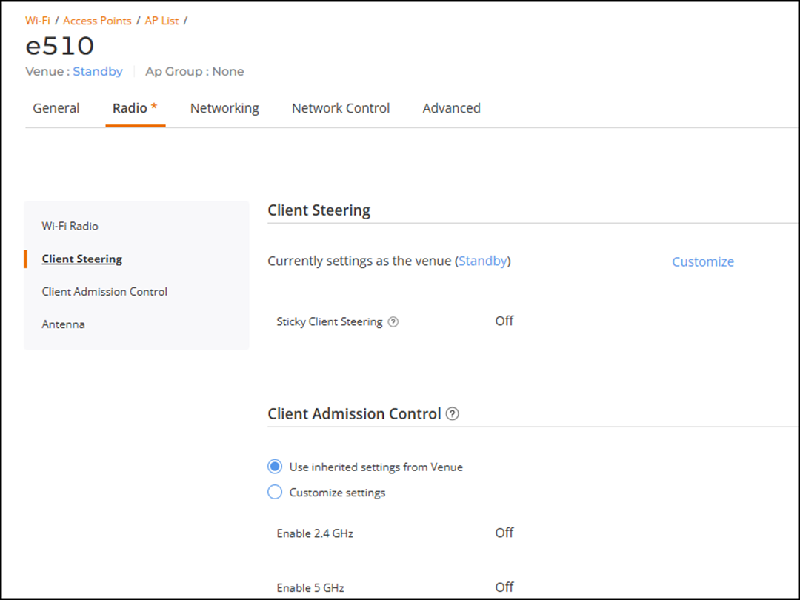
Customizing Sticky Client Steering Settings Per AP
You can customize the Sticky Client
Steering settings at the AP level.
- On the navigation bar, click
.The AP List page is displayed.
- Click the name of the AP for
which you want to customize the Sticky Client Steering settings, then on the
Overview page, click Configure.
Alternatively, click the check box for the specific AP name, then click
Edit.The AP configuration page is displayed, defaulting to the General tab view.
- Select the Radio tab.By default, the Wi-Fi Radio section is displayed.
- From the left mini navigation bar, click the Client Steering sub-tab.
- Click Customize to override the venue-level settings.
- Toggle the Sticky Client
Steering switch to ON and configure
the following values:
- SNR Threshold: The Signal-to-Noise Ratio (SNR) threshold is a value that determines the minimum acceptable SNR for a client device to maintain a connection with an AP. Enter a threshold value ranging from 5dB to 30dB. The default value is 15dB.
- Neighbor AP: The Neighbor AP % threshold is a
value that represents the minimum acceptable percentage of signal
strength from neighboring APs compared to the current AP. Enter a
threshold value ranging from 10% to 40%. The default value is 20%.Enabling this feature assists clients with low SNR in transitioning to a better-performing AP. Note that this function requires load balancing to be enabled at the venue level and will automatically disable the SmartRoam feature on the AP.
- Click Apply.