Adding and Managing a MAC ACL on a Switch
You can add and manage a MAC Access
Control Lists (ACLs) on switch ports from the RUCKUS One web interface.
- From the navigation bar, select
.The Switches page is displayed.
- Click on a specific switch and
in the Overview tab, select the ACLs
sub-tab. By default, the Layer 2 sub-tab is displayed with the following information:
- ACL Name: Displays the name of the MAC ACL.
- Type: Displays the MAC ACL type.
- --: The MAC ACL at the switch level does not have the same name at the Policies & Profiles level.
- Shared: The MAC ACL at the switch level has the same name and rules as the Switch Layer 2 Access Control policy defined in the system. Any change to the policy automatically updates the switch-level settings.
- Customized: The MAC ACL at the switch level shares the same name as the Switch Layer 2 Access Control policy but includes customized rules. Changes to the policy do not affect the switch-level settings.
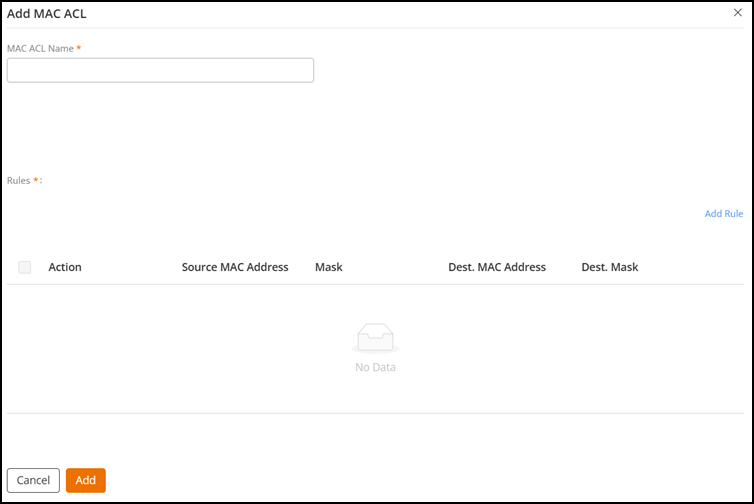
- Click Add MAC ACL and
configure the following settings:
- Enter a MAC ACL name.
- Under Rules,
click Add
Rule.
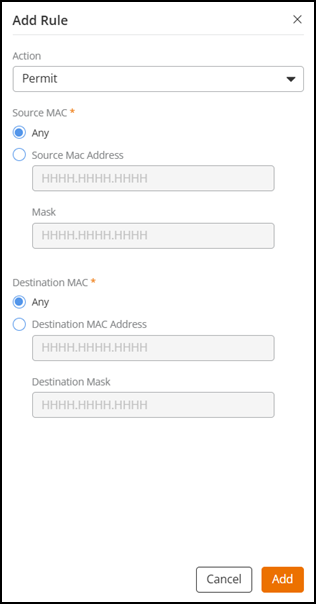
Configure the following settings:
The Add Rule sidebar is displayed.- For Action, select an MAC ACL rule (Permit or Deny).
- For Source MAC, select Any or Source MAC Address to enter a source MAC address and mask. The mask is used to define a range of MAC addresses. The mask comprises 0 and f characters. In each bit position, an f means that the bit is not checked, and a 0 means that the bit must equal the value in the defined MAC address. For example, mask 0000.0000.0000 matches only the defined MAC address, whereas mask ffff.ffff.ffff matches all MAC addresses.
- For Destination MAC, select Any or Destination MAC Address to enter a destination MAC address and destination mask.
- Click Add. You can see the new MAC ACL rule added in
the Rules table.
Select a specific MAC ACL rule and click Edit or Delete to perform the edit or delete operations, respectively.
- Click Add.
- (Optional) From the list of existing MAC ACLs, click the radio button for a specific policy and perform the following actions:
- (Optional) Click on a specific MAC ACL to view the MAC ACL configuration details page.