Unmanaged Chromebook User Experience
With an unmanaged Chromebook device, the user downloads and installs the ONC file, which contains configuration information required to access the secure network, including the certificate and Wi-Fi settings.
For unmanaged devices, the application detects the Chrome operating system and displays instructions for installing the Chrome configuration on the device.
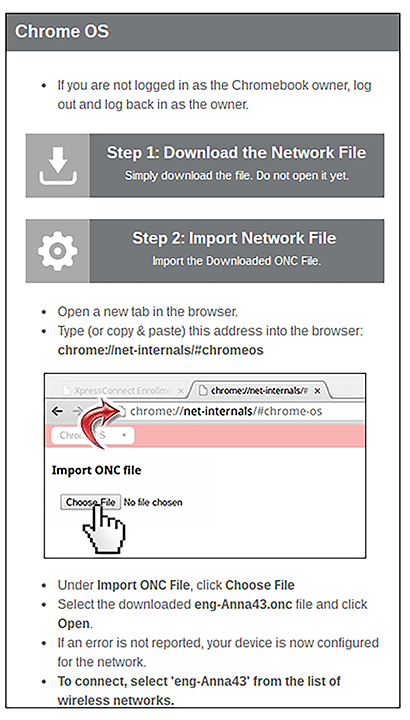
The manual download page shows the Chromebook instructions.
Step 1 provides the link to download the ONC file.
Step 2 provides instructions for importing the ONC file.
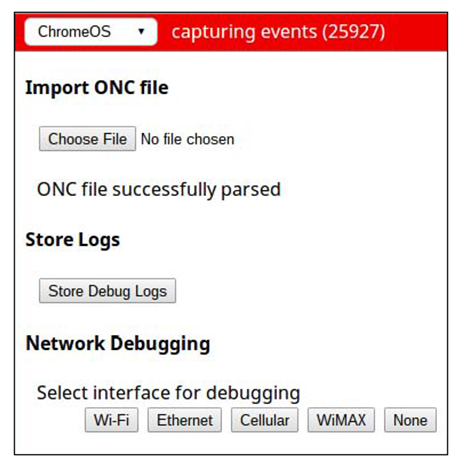
- Copy the URL from the instructions.
- Paste the URL into a new browser window. The Chrome OS Import ONC File page displays.
- Click Choose File and browse to select the <NetworkName>.onc file.
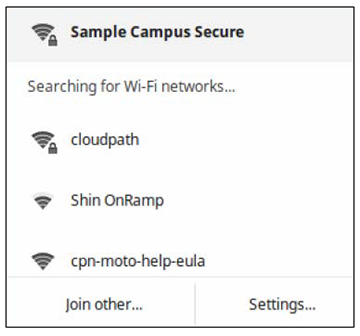
After the ONC file installed, click the Wi-Fi icon in the bottom right corner of your screen and select the secure network.
Typically, user credentials are populated using the information passed during the enrollment process. Click Connect.
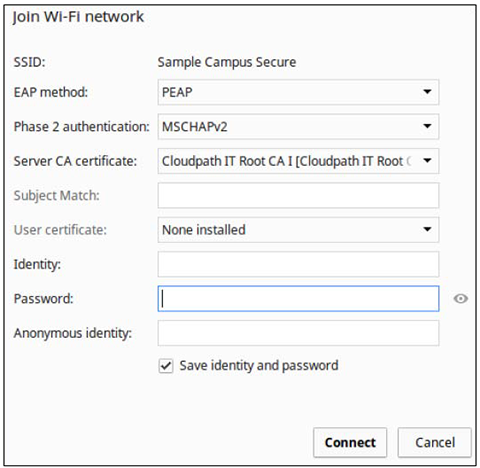
The user should now be connected to the secure network.