Method 3: Register the Controller with the DNS Server
If you register the controller with your DNS server, supported APs that request IP addresses from your DHCP server will also obtain DNS related information that will enable them to discover controllers on the network. Using the DNS information they obtained during the DHCP request, APs will attempt to resolve the controller IP address using RuckusController.{DNS domain name} and zonedirector.{DNS domain name}.
To register the controller with the DNS server, do the following.
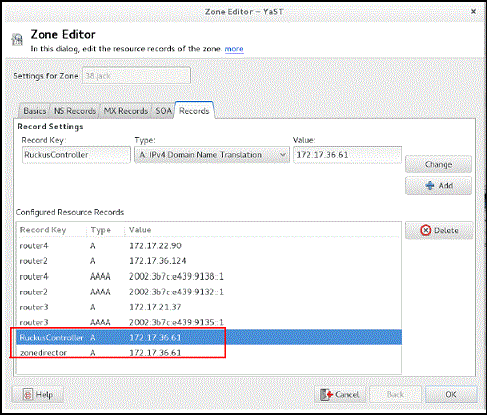
- Open the DNS zone file, and then add two records with the following information:
-
Record Key#1: RuckusController
Type: A (IPv4 Domain Name Translation)
Value: (IP address of the controller)
-
Record Key#2: zonedirector
Type: A (IPv4 Domain Name Translation)
Value: (IP address of the controller)
-
- Save the zone file.
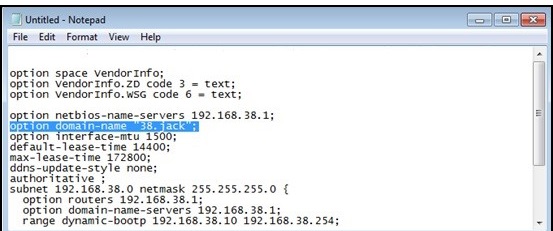
- Open the DHCP configuration file, and then insert the DNS domain name in the DHCP
configuration file.
For example, if the DNS domain name is “38.jack”, insert the following line into the DHCP configuration file:
option domain-name “38.jack”
- Save the DHCP configuration file.
When the AP obtains the DNS domain name from the DHCP server (using “Domain Name option 15” in the DHCP-offer packet), it will resolve “RuckusController.{domain-name}” and “zonedirector.{domain-name}” through the DNS server, and then it will obtain the controller’s IP address from the DNS server’s response.