Single Sign-On (SSO) Settings
Brand Administrators have the option to use either RMS, which is for local users, or RADIUS, which is for users from a RADIUS server. If a Brand Administrator selects the RADIUS option, the ability to create Local Domain Admins or Group Admins will be disabled.
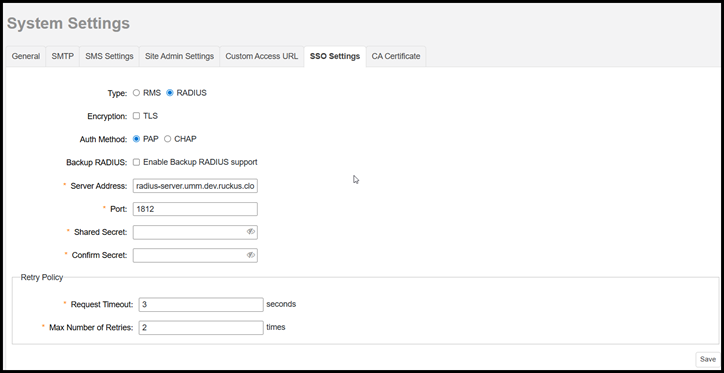
- Type: If Brand Admins switch from RMS to RADIUS, all local users will be blocked. Users in RADIUS cannot create, edit, or delete other users. However, if you choose the RMS option, you will still be able to create local Domain or Group Admins as usual.
- Encryption: If you
want to enable encryption of RADIUS packets using Transport Layer Security (TLS),
select the TLS
encryption checkbox. This allows RADIUS authentication and accounting data to be
passed safely across insecure networks such as the Internet.
Note: If you want to enable TLS encryption, you must also upload the Certificate Authority (CA) certificate to verify the identity of RADIUS server. Refer to Certificate Authority for more information.
- Auth Method: Choose PAP or CHAP according to the authentication protocol used by your RADIUS server. This option is available only if you select the RADIUS server.
- Backup RADIUS: If a backup RADIUS or RADIUS Accounting server is available, you can select the Enable Backup RADIUS support and additional fields appear. Enter the relevant information for the backup server and click Add. When you have configured both the primary and backup RADIUS servers, an additional option is available in the Test Authentication Servers Settings tab to choose to test against the primary or the backup RADIUS (or RADIUS Accounting) server.
- Server Address: Enter the IP address or the domain name of the RADIUS or RADIUS Accounting server (and backup RADIUS or RADIUS Accounting server, if enabled).
- Port: The default port (1812) should not be changed unless you have configured your RADIUS server to use a different port.
- Shared Secret: Enter a password for communication between the RMS and the RADIUS (or RADIUS Accounting) server.
- Confirm Secret: Re-enter the shared secret.
- Under Retry Policy,
complete the following steps:
- Request Timeout: The maximum time the system will wait for a response from the RADIUS (or RADIUS Accounting) server before considering the request failed. Enter a value (in seconds).
- Max Number of Retries: The maximum number of times the system will retry sending a request to the RADIUS (or RADIUS Accounting) server if no response is received. Enter a retry value.
- Click Add to save your AAA server entry.
RADIUS Server Setting
You must follow these guidelines when creating a RADIUS user on your own RADIUS server.
- A RADIUS username does not have to be an email address; it can be any alphanumeric string.
- A RADIUS user must be either a Domain Admin or a Group Admin in the RMS. A Brand Admin cannot be configured within the RADIUS server.
- The RADIUS administrator is responsible for configuring the email, role, Domain name, and Group name (if the role is Group Admin) for each account on the RADIUS server.
After creating the Domain Admin or the Group Admin, the user can start using the RMS.
Supported RUCKUS RMS RADIUS Attributes
The following attributes are supported by RUCKUS RMS RADIUS user:
- Ruckus-WSG-User: This attribute contains the user's role and email address, seperated by a ":".
- Ruckus-Zone-Name: This attribute includes the user's Domain and Group, seperated by a ":".
The following shows the RADIUS user attributes related to RMS login.
"Vendor"       "Vendor ID"       "Attribute"               "type ID"         "Value Type"
Ruckus            25053        Ruckus-WSG-User              10                     string
Ruckus            25053       Ruckus-Zone-Name              134                    string
The following shows how a RADIUS server assigns a Domain Administrator role to a user.
Vendor-Specific: Ruckus (25053)
   Ruckus-WSG-User(10): domain_admin: {email}
Vendor-Specific: Ruckus (25053)
   Ruckus-Zone-Name(134): {domainName}
The
following shows how a RADIUS server assigns a Group Administrator role to a
user.Vendor-Specific: Ruckus (25053)
Ruckus-WSG-User(10): group_admin: {email}
Vendor-Specific: Ruckus (25053)
Ruckus-Zone-Name(134): { domainName}:{groupName}